
 English
 Deutsch
 日本語
日本語 简体中文
简体中文 Français
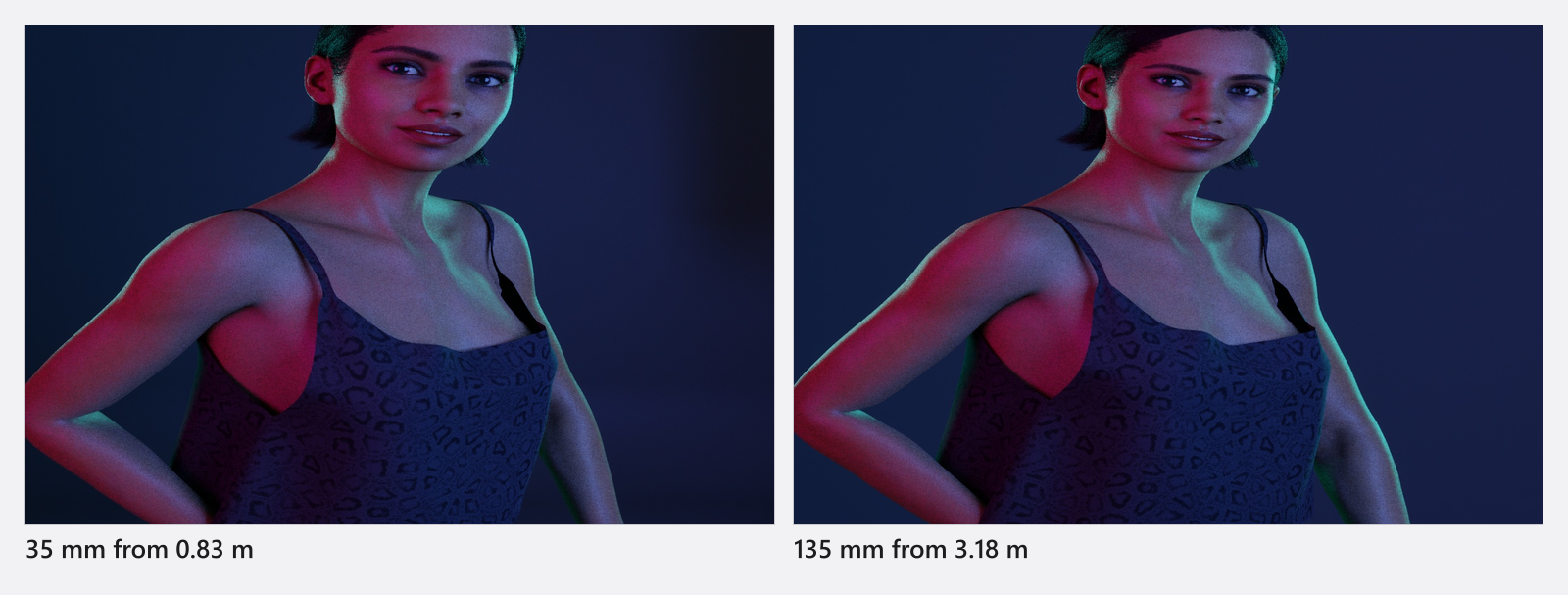
Focal length decides how much of the studio fits into the frame and how strongly the picture compresses distance — the classic 85 mm portrait look against a wide 24 mm environmental shot. You first mount a lens on the camera and then set the focal length inside that lens’s range, exactly as you would on set.
Applies to BASIC, STUDIO, CINEMA · You need: a project open on the SETUP tab and a camera in the set. Lenses are the same in every edition; only the camera bodies are gated.
Where to find it
Everything you need sits on the camera preview: the lens list in the camera bar above the image, the vertical zoom slider in the control strip to its right, and the focal-length read-out directly above that slider.
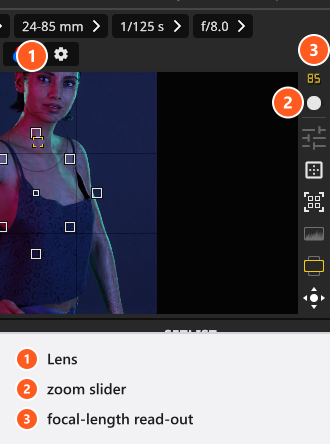
The same two values are in the inspector: Equipment → Lens for the lens, Settings → Focal Length for the millimetre value.
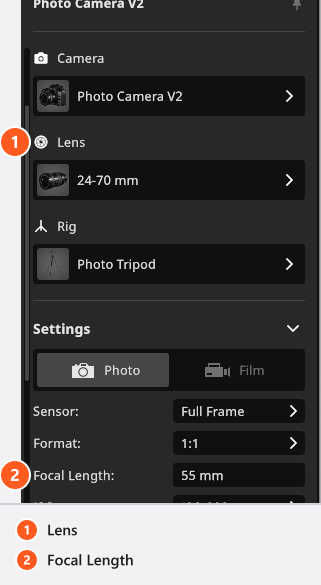
Mount a lens
Click the lens button in the camera bar, or the button below Lens in the inspector, and pick an entry from the Lenses list. The camera keeps its position; only the framing changes. A focal length outside the new lens is pulled into its range — a camera at 200 mm drops to 70 mm when you mount the 24-70 mm.
Unless you changed Default Lens in the App Manager, a newly placed camera arrives with the built-in 24-70 mm zoom. Lenses of your own can be created and edited in every edition — name, barrel model, focal range and Lens Luminosity — see Set up your own camera kit.
Lens Luminosity records the fastest f-stop of the lens for your own reference. Mounting the lens does not change the camera’s Aperture, and nothing stops you from choosing a faster f-stop afterwards.
Zoom
- Drag the slider beside the preview and watch the framing update live.
- Or type the value into Focal Length; it is rounded to whole millimetres.
- Or press
+and-(by default) with a camera selected for1 mmsteps. The main-row keys work on every keyboard, the keypad keys only on one that has a keypad. Both act on every camera in your selection, as long as a camera is the object you selected last and you are on the SETUP tab.
The slider only works on a zoom lens and it follows that lens’s range. On a prime it is greyed out and Focal Length is fixed to the one value the lens has — mount another lens if you want a different framing without moving the camera.

Changing the focal length only re-frames the photograph. It does not move the camera, so the light on your subject stays exactly as you built it — a safe way to try framings on a finished lighting set.
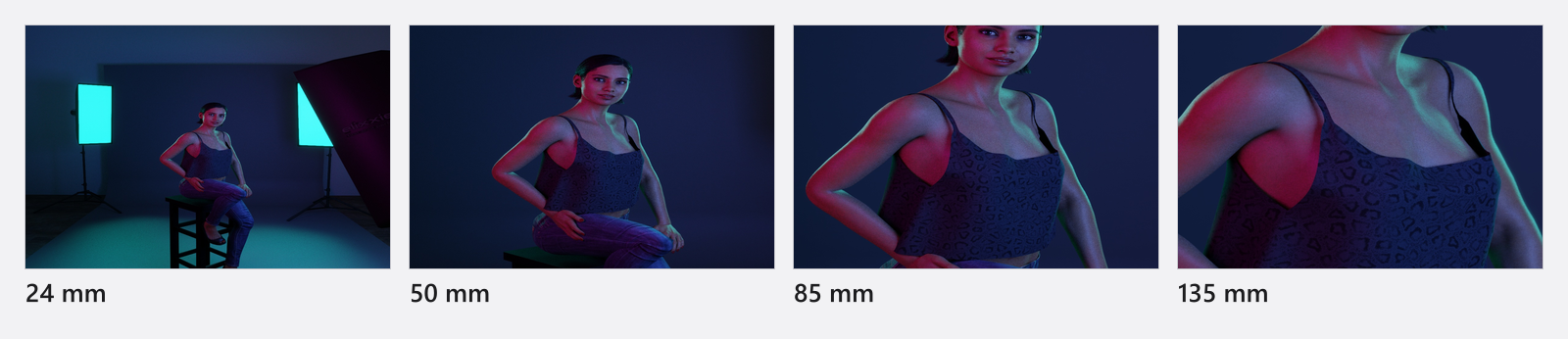
Focal length, sensor and format together
The angle of view follows from the focal length together with Sensor and Format: the sensor gives the recording area, the format crops it to the aspect ratio you shoot, and the height of that crop decides the angle. The same 50 mm is therefore tighter on a smaller sensor. The crop factor is part of each sensor’s name, so you can read the full-frame equivalent straight off the label.
| Sensor | Crop factor | 50 mm frames like |
|---|---|---|
| Full Frame | 1 | 50 mm |
| APS-C (Crop 1.5) | 1.5 | 75 mm |
| Four Thirds/MFT (Crop 2) | 2 | 100 mm |
| Medium Format (Crop 0.64) | 0.64 | 32 mm |
Those are the usual rounded photographic figures. The angle of view is worked out from the height of the cropped frame, so on a 3:2 frame the exact equivalents come out a little longer than the round numbers — close enough to plan with, worth knowing when you compare the result with a real shot.
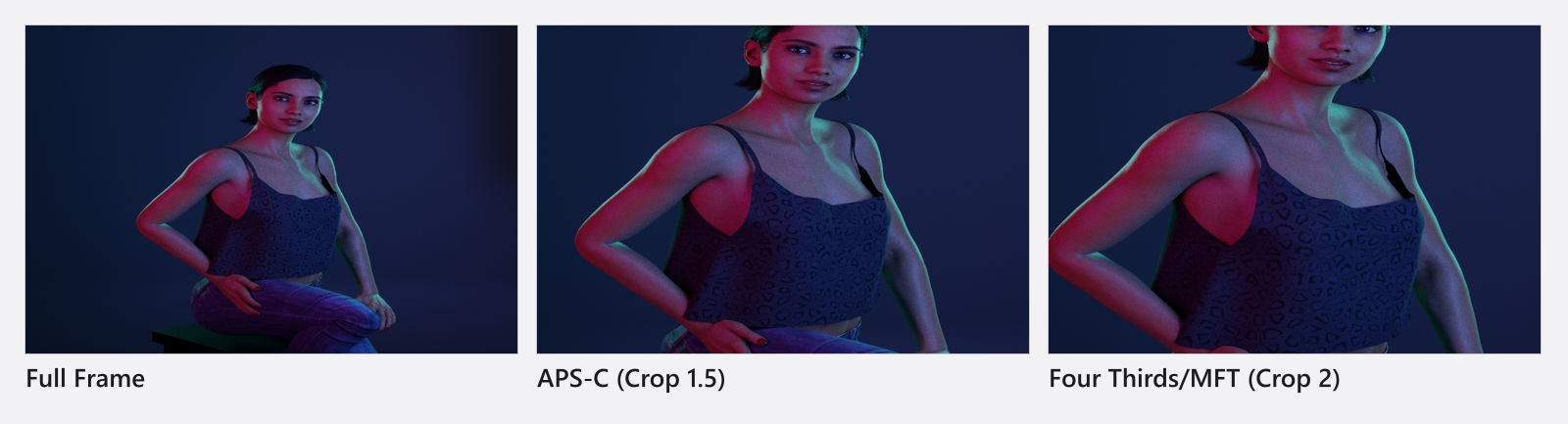
Keep a framing when you change bodies
The table above reads the other way round from this job: it says what happens when you keep the lens and change the body. To keep the framing instead, you go against it — on a smaller sensor you need a shorter focal length.
- Note the focal length and the sensor you are on before you swap.
- Pick the new body. → It brings its own Sensor and Format with it, so the framing changes as well as the body.
- Divide the old focal length by the new crop factor and multiply by the old one, then type the result into Focal Length. Going from Full Frame to APS-C (Crop 1.5),
50 mmbecomes about33 mm; going to Medium Format (Crop 0.64), about78 mm.
Changing the Format alone crops the frame without changing the lens, which is the cheaper way to deliver one shot in two shapes — see Plan one shot for several deliveries.
Tips & limits
- Longer focal lengths need distance. If a
135 mmframing pushes the camera through the studio wall, move the model forward or work in a larger room. - Wide lenses show much more background, so plan a wider backdrop before you commit to
24 mm. - Focal length also drives the background blur, together with the aperture — see Focus and depth of field.
- Focal Length and the mounted Lens can both be keyframed, so a zoom or a lens change can run over time (add-on: Animation Tool) — see Animate the camera.
- On a film camera an Anamorphic factor widens the frame on top of all this — see Film camera.
All 52 lenses
The lenses are generic focal-length ranges, not simulations of particular products: 26 zooms from 11-16 mm to 70-300 mm and 26 primes from Fix 16 mm to Fix 200 mm.
Lenses
| Name | Key facts |
|---|---|
| 11-16 mm | 11–16 mm zoom |
| 12-40 mm | 12–40 mm zoom |
| 14-35 mm | 14–35 mm zoom |
| 14-42 mm | 14–42 mm zoom |
| 14-54 mm | 14–54 mm zoom |
| 15-85 mm | 15–85 mm zoom |
| 16-35 mm | 16–35 mm zoom |
| 16-55 mm | 16–55 mm zoom |
| 17-35 mm | 17–35 mm zoom |
| 17-40 mm | 17–40 mm zoom |
| 17-50 mm | 17–50 mm zoom |
| 17-85 mm | 17–85 mm zoom |
| 18-135 mm | 18–135 mm zoom |
| 18-300 mm | 18–300 mm zoom |
| 18-35 mm | 18–35 mm zoom |
| 18-55 mm | 18–55 mm zoom |
| 24-105 mm | 24–105 mm zoom |
| 24-70 mm | 24–70 mm zoom |
| 24-85 mm | 24–85 mm zoom |
| 26-75 mm | 26–75 mm zoom |
| 28-75 mm | 28–75 mm zoom |
| 35-100 mm | 35–100 mm zoom |
| 40-150 mm | 40–150 mm zoom |
| 55-250 mm | 55–250 mm zoom |
| 70-200 mm | 70–200 mm zoom |
| 70-300 mm | 70–300 mm zoom |
| Fix 100 mm | 100 mm fixed focal length |
| Fix 105 mm | 105 mm fixed focal length |
| Fix 110 mm | 110 mm fixed focal length |
| Fix 120 mm | 120 mm fixed focal length |
| Fix 125 mm | 125 mm fixed focal length |
| Fix 135 mm | 135 mm fixed focal length |
| Fix 150 mm | 150 mm fixed focal length |
| Fix 16 mm | 16 mm fixed focal length |
| Fix 180 mm | 180 mm fixed focal length |
| Fix 20 mm | 20 mm fixed focal length |
| Fix 200 mm | 200 mm fixed focal length |
| Fix 24 mm | 24 mm fixed focal length |
| Fix 25 mm | 25 mm fixed focal length |
| Fix 28 mm | 28 mm fixed focal length |
| Fix 30 mm | 30 mm fixed focal length |
| Fix 35 mm | 35 mm fixed focal length |
| Fix 40 mm | 40 mm fixed focal length |
| Fix 42.5 mm | 42.5 mm fixed focal length |
| Fix 45 mm | 45 mm fixed focal length |
| Fix 50 mm | 50 mm fixed focal length |
| Fix 55 mm | 55 mm fixed focal length |
| Fix 58 mm | 58 mm fixed focal length |
| Fix 75 mm | 75 mm fixed focal length |
| Fix 80 mm | 80 mm fixed focal length |
| Fix 85 mm | 85 mm fixed focal length |
| Fix 90 mm | 90 mm fixed focal length |
Troubleshooting
- The zoom slider is dead. A prime is mounted. Its Focal Length cannot change.
- My typed focal length snapped to another value. The value is rounded to whole millimetres and held inside the range of the mounted lens.
- More symptoms: Camera problems.