
 English
 Deutsch
 日本語
日本語 简体中文
简体中文 Français
The equipment list is the last part of a PDF set plan and the one page that leaves the studio with the van: every camera, lens, light, shaper, stand and helper the plan needs, with a quantity, a tick box and a note column for the gear you really own. It is built from the shots that are in the plan, so it is only complete once every shot you intend to build is in it.
Applies to BASIC, STUDIO, CINEMA · You need: a PDF plan with at least one shot, open in the PLANS tab.
The clip fills a list for a two-shot job. One correction: at 01:56 the narrator calls the per-shot page “the equipment list” — that page is the Set List. The Equipment List is the single list for the whole plan.
Where to find it
Switch Equipment List on in the Layout section of the right panel; it is the last entry there and exists in PDF plans only. The pages appear at the end of the page overview, headed Equipment List, with Shooting (the project name) and Location (the value from the cover) above the tables.
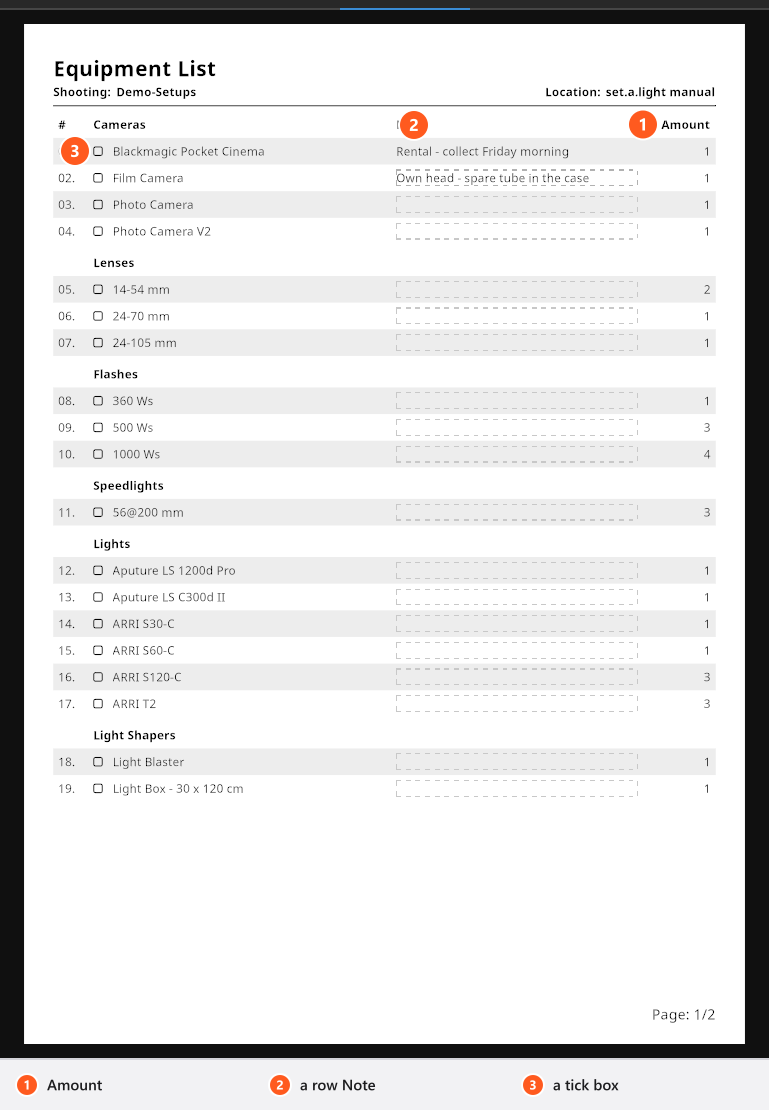
One table per category, in this order: Cameras, Lenses, Flashes, Speedlights, Lights, Light Shapers, Equipment and Tripods. Inside a table the rows are sorted by name. Equipment collects the passive helpers — reflectors and diffusers. Each row carries a running number, the name, a Note cell and Amount.
How to build the list
- Tick every shot that belongs to the job in the panel on the left. → The tables are rebuilt from those shots; gear from shots you left out does not appear.
- Click a Note cell and type what you are actually bringing:
Profoto B10 instead,rental, pick up 08:00, the body and lens you own. → The text is stored with the plan and printed in that row. - Click the Note field under the tables to open the editor for the general note, type, and confirm with OK. → The note is printed from the end of the last table onwards.
Why Amount is not a sum
Amount is the largest number of that item any single shot in the plan needs — not the total across all shots. Three shots that each use one beauty dish show 1, because you only have to bring one dish and re-use it. A shot that uses two strip boxes at the same time makes the whole list say 2.
That is the number you pack, and it is the reason the value cannot be edited: it is recounted from the shots every time the plan changes.
The general note, and how it flows
There is one general note per list, not one per page. Its editor is a dialog titled Note with OK and Cancel; the text box has exactly the width of the printed box, so the line breaks you see are the line breaks you get. The note starts under the tables of the last page that still carries rows and continues onto further pages as it grows. A very long note stops after a hundred continuation pages.
If you open a plan that was made before this version and had a note on several pages, those notes are merged into the single note when the plan loads. The text is kept in full, but it moves to the end of the list — and the merge happens once and cannot be undone, so check the result before you save.
Tick boxes are for paper
The box in front of every row is a printed graphic, not a setting: it is drawn empty in the PDF so that somebody can tick it with a pen. Nothing you click on screen is stored there.
Tips & limits
- A row note belongs to the plan and to that piece of gear, not to the shot: take the gear out of the plan and put it back, and the note is there again.
- Props, models, rooms and backgrounds are not in the equipment list. The per-shot Set List page carries props, if you switch Include Props on for that shot.
- A light contributes up to three rows: the light source itself, its shaper with the fitted variant, and its stand.
- The list paginates by itself; a long rig fills two or three pages.
- The list is not available in a JPG plan, which has neither a cover nor an equipment list.
Troubleshooting
- Amount is smaller than I expected. It counts the largest need of one shot, not the sum of all shots.
- A light is missing from the list. Its shot is not ticked into the plan, or the plan is a JPG plan.
- My old notes have moved to the end of the list. They were merged into the one general note when the plan was loaded — see above, and Something looks wrong: start here.