
 English
 Deutsch
 日本語
日本語 简体中文
简体中文 Français
The camera is the object most people meet a surprise on, because several of its controls are only active in a particular state: attached to a rail, on manual focus, with a prime lens fitted. This page names the state behind each symptom.
The preview is empty and the camera bar is grey
Cause. The set has no camera at all, or none that could be resolved: the last camera was deleted, or a file’s camera reference points at something that is not there. Deleting the active camera out of several is not a cause — the next camera in the set takes over by itself.
What to do. Undo the deletion, or place a new camera from the library and, if the set has several, use Make This Camera Active. The active camera row is marked (active) in the set list — see The set list and the timeline.
Changing the shutter does not brighten my flash
Cause. This is the studio rule, modelled faithfully. A flash is over long before the shutter is, so its contribution to the image does not depend on the shutter speed. Only a shutter shorter than 1/3200 s starts to cut the flash off, and then the brightness scales down with the time.
What to do. Change the flash power or the aperture to control the flash, and use the shutter to control the ambient light and the modeling light — those two do follow it. See Set the exposure.
My focus jumped to the background
Cause. Automatic focus is measured along a point in the frame, not locked to an object. Move the model out of that point and the measurement lands on whatever is behind it.
What to do. Pick the focus point again, or switch to Manual Focus and type the distance. See Focus and depth of field.
Clicking the focus points does nothing
Cause. Manual Focus is on, and it overrides the focus points.
What to do. Switch Manual Focus off to use the points again, or set the distance in its field.
The focus distance jumped to a huge value
Cause. The focus measurement looks along a ray. When that ray hits nothing at all, the result is “infinity” — a very large number, not an error.
What to do. Aim at something, or use Manual Focus with a sensible distance. Typed values are clamped to the field’s own range.
The camera will not go onto the rail
Cause. Attaching happens by dropping the camera onto the rail in the studio view, and a drag that is being constrained — held along the floor, or with a modifier key down — does not land on it.
What to do. Drag the camera onto the rail without holding anything, or use the attach button in the camera’s own controls. See Build a dolly track.
The camera’s position and rotation fields are greyed out
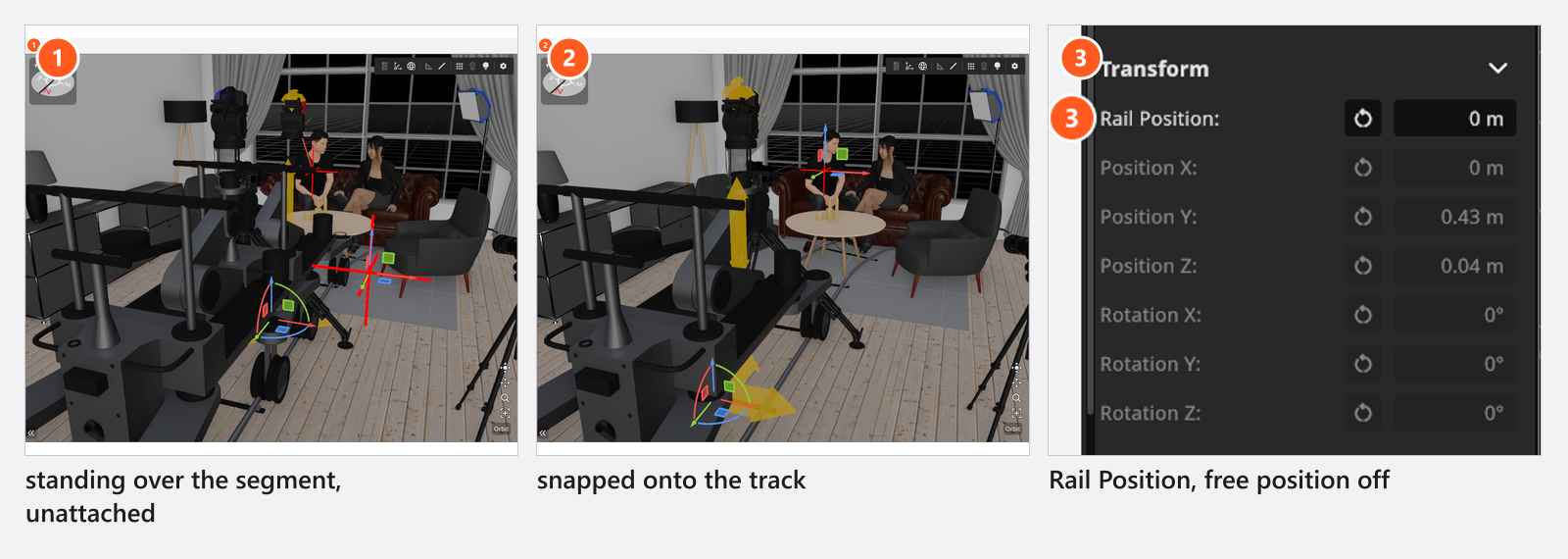
Cause. The camera is attached to a rail. The track then decides both where the camera sits and which way it faces, so Position, Rotation and Scale Factor are all inactive together.
What to do. Use Rail Position instead — the field appears in the same group as soon as a rail is attached, and it is the distance along the track. To aim the camera, use the head angles in the mount’s own group; those keep working on a rail. On a tripod, a column stand or the crane that is Pitch, Yaw and Roll; the Dolly and the Fisher 10 carry a fluid head, which has Pitch and Yaw only. Detach the camera to get the three fields back.
There is no Roll on my dolly camera
Cause. The mount, not the track. The Dolly and the Fisher 10 carry a fluid head, which tilts and pans and does not roll, like the real thing — so their head group offers Pitch and Yaw and no Roll. That is the same on a track and standing free; the track has nothing to do with it.
What to do. For a portrait frame use Orientation, or the landscape/portrait button beside the preview: it turns the camera on its plate, so a portrait shot from a dolly stands upright like any other. For a deliberately tilted horizon, put the camera on a mount that has the axis — a Photo Tripod, a Film Tripod, a Column Stand or the Camera Crane. Which mount has which axis is in Camera rigs: axes and limits.
The crane Height barely moves the camera
Cause. On a crane, Height is the elevation of the base, not of the camera. The arm decides where the camera ends up.
What to do. Use the arm’s own axes for the camera height. Which axis means what on which rig is in Camera rigs: axes and limits.
The tripod has disappeared
Cause. A stand model covers a range of heights. Outside that range the model hides itself rather than showing a stand that does not exist in that shape. The camera stays where you put it.
What to do. Bring the height back into the range or pick a different rig. W (by default) shows and hides stands in general.
The studio view looks different from the preview
Cause. They are two different calculations. The studio view is a working view; it is always sharp, has no image grade and no depth of field, and it does not show the picture the camera would take.
What to do. Judge framing, focus and grade in the camera preview. Why the two differ is in Graphics problems and How the renderer works.
G, F or H do something else
Cause. Shortcuts follow the panel under the pointer. Over the camera preview those keys drive the preview overlays; over the studio view they drive the grid and the framing of a selection.
What to do. Put the pointer over the panel you mean, outside any text field, before you press the key. These are default keys and can be changed in Settings → Shortcuts…; the contexts are listed in Keyboard shortcuts.
The zoom slider is dead
Cause. A prime lens is fitted. It has one focal length, so the slider has nowhere to travel.
What to do. Fit a zoom lens if you want to change the focal length without changing lenses. See Choose a focal length.
Film is greyed out
Cause. The film camera is not part of BASIC. The button is there and inactive rather than missing.
What to do. Work with the photo camera, or compare the editions in BASIC, STUDIO and CINEMA compared.
Not a bug
- The camera preview is noisy for a moment after every change. It is refining; leave it alone and it finishes.
- A camera on a rail hands its whole placement to the track — orientation as well as position. That is why Rotation is inactive together with Position; the mount’s head angles are where you aim.
- The exposure values of a new camera are
f/9.0, ISO200and1/125 s. A screenshot of a set you downloaded may well show something else.