
 English
 Deutsch
 日本語
日本語 简体中文
简体中文 Français
Colour is applied at the light, exactly as a gel is on a real shoot: a warm key, a blue background, a correction filter that brings a tungsten fixture up to daylight. The filter list holds 56 Lee presets, and the same list quietly holds the neutral-density and diffusion filters most users never find. Everything here works the same way in every edition.
Applies to BASIC, STUDIO, CINEMA · You need: a project open on the SETUP tab with a light selected.
Where to find it
The Color Gels group sits at the bottom of a light’s inspector. The small colour button next to the light in the studio view and in its set-list row opens the same chooser, there with Custom and Lee as two tabs.
How to put a gel on a light
- Select the light and open Color Gels in the inspector.
- Switch the mode from None to Lee. → A preset button appears below, reading
---until you pick one. - Click the button, pick a filter from the list, and close the popup. → The light takes the filter’s colour, the button shows the filter’s name and swatch, and the render updates.
To take the gel off again, set the mode back to None: the light goes back to its own colour temperature. Custom is the third mode — any colour from the picker rather than a filter from the list.
Find the filter you need
The list is long, so it comes with three tools: a search field that matches the preset name, three category buttons — All, Color and CTO / CTB (that third label is English in every interface language) — and a star on every row. Star the gels you actually own, then switch the favourites button on and the list shows those only. The category and the favourites filter stay as you left them; the search box starts empty each time.
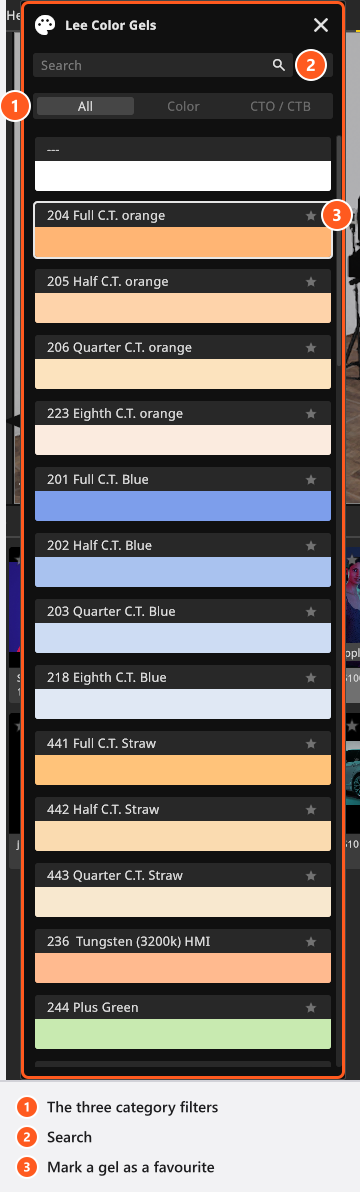
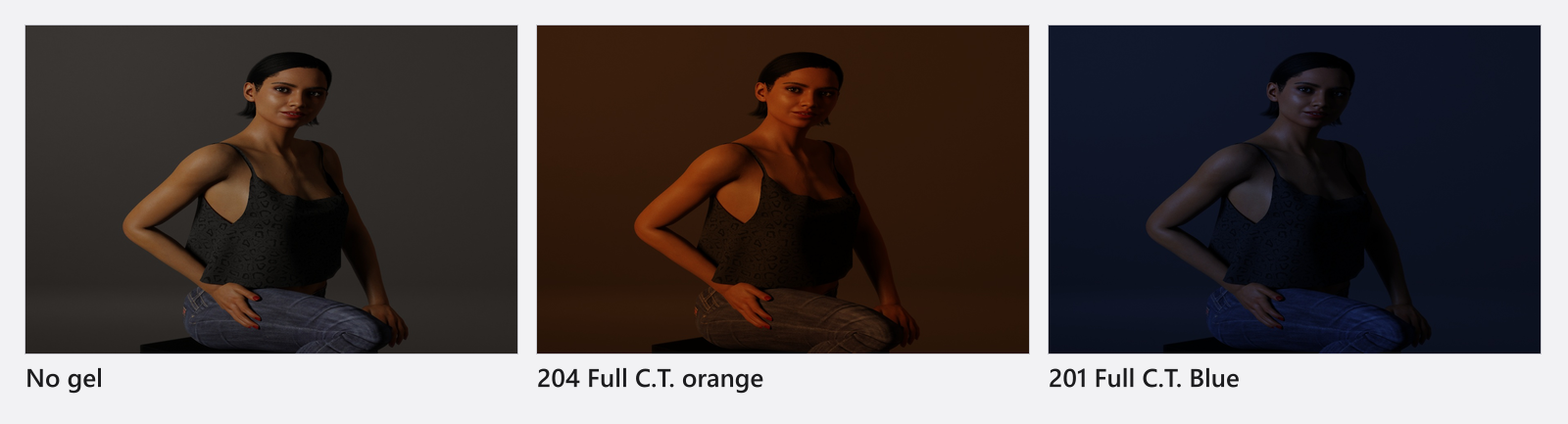
Under CTO / CTB you get the 14 colour-correction filters: the orange series 204 Full C.T. orange, 205 Half C.T. orange, 206 Quarter C.T. orange, 223 Eighth C.T. orange, the blue series 201 Full C.T. Blue to 218 Eighth C.T. Blue, the straw series 441 to 443, plus 236 Tungsten (3200k) HMI, 244 Plus Green and 247 Minus Green. Use them the way you would on set: correct the fixture to the white balance the camera is set to, and let the camera keep one white balance for the whole shot — see Set the exposure.
The other 42 presets sit under Color, and three groups of them are not colours at all:
| Looking for | Presets |
|---|---|
| Neutral density, to hold a light back without touching its dimmer | 209 0.3ND, 210 0.6ND, 211 0.9ND |
| Diffusion frost, to soften a hard source | 129 Heavy Frost, 216 White Diffusion, 250 Half White Diffusion, 251 Quarter White Diffusion, 252 Eighth White Diffusion |
| Saturated colour for backgrounds and accents | the rest, sorted around the colour wheel from red through yellow and green to blue, violet and pink, with the pastels at the end |
Mix and keep your own colours
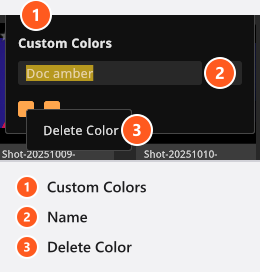
Choose Custom and a button appears showing the colour as a hex value; click it and the picker opens. It has a colour field, a hue bar, and a dropdown that switches the numeric input between hex, RGB and HSB — the place to type a colour your art director sent you. Three groups of swatches sit around it: up to four recent colours in the top row, beside the old and the new colour; a fixed built-in palette under the numeric input; and your own saved colours under Custom Colors. Type a name into the field of that last row, click the + button, and the colour joins it for good; right-click a saved swatch and choose Delete Color to remove it. The recent colours are not kept when you close the program; the named ones are.
What travels with the set, and what stays here
The gel on a light belongs to the set: it is saved with the project, comes back with the shot and travels with a setup you share. Your favourites, the category you last used and your saved custom colours are preferences on this computer — a colleague who opens your set sees your gels, not your swatch row.
Tips & limits
- A gel costs light, and a deep one costs a lot. If a saturated blue looks under-exposed, raise the head rather than the ISO.
- The colour is on the light, not on the camera. Two lights can carry two different gels in the same frame; the camera’s white balance then decides which of them reads as neutral.
- The filter list was revised in this release: it grew to 56 presets, the 41 existing colours were corrected against the filter maker’s published data, and
135 Dark Orangeis now listed as158 Deep Orange. A set stores which filter you chose rather than its colour, so a set you built with an earlier version 3 takes the corrected values and can look slightly different; a set that came from version 2.5 keeps its original colours. - For light with a pattern in it rather than a colour, see Project a pattern or an image.
Troubleshooting
- The preset button shows
---. No filter is chosen yet, or the mode is still None. - My gelled light turned white. The set points at a filter this version does not have, which happens with a set from a much older program version; pick the filter again.
- More symptoms: Lighting problems.