
 English
 Deutsch
 日本語
日本語 简体中文
简体中文 Français
Daylight is the one light on a set that changes by itself, and a shot that follows it sells an outdoor location better than any still: the sun climbing, the shadows swinging round, the air thickening towards evening. The Environment and a fog machine are animation targets like any other object, so all of it comes from a handful of keyframes.
Applies to BASIC, STUDIO, CINEMA · Needs the Animation Tool add-on (included in the CINEMA trial) · You need: a saved shot with an outdoor or HDRI environment, open on the SETUP tab with the ANIMATION tab active in the library panel.
Where to find it
Environment is the first row of the set list. Select it and it becomes a row in the object list of the animation editor, with one track per keyed setting. In a closed room with the camera inside, the row is not in the list at all — open a wall or move the camera outside to reach it, which is the same condition that stops the animation from having any effect (see Troubleshooting below).
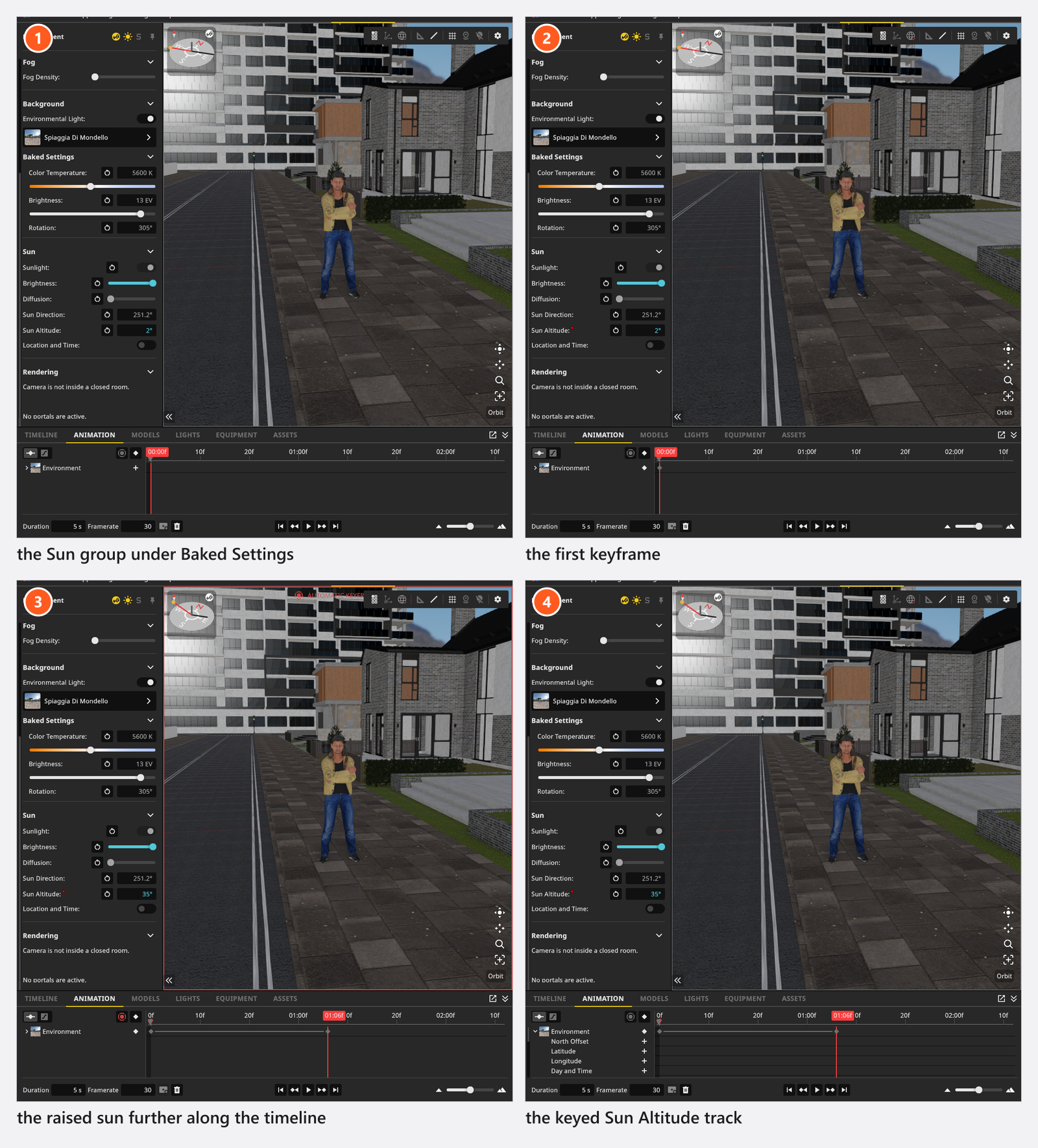
In a set that uses an HDRI, the sun controls sit in the Sun group under Baked Settings in the environment inspector, and both are open when you get there — the map brings its own sun, brightness and colour temperature, and those are the fields that override them. You find the Sunlight switch and, with the sun on, Brightness, Diffusion, Sun Direction and Sun Altitude.
Three of those five are named differently in the animation editor. The rows you key are the ones on the right:
| Inspector | Animation row |
|---|---|
| Sunlight | Sun Active |
| Brightness | Sun Brightness |
| Diffusion | Sun Diffusion |
How to animate a sunrise
- Under Baked Settings, set the sun where the shot should start: Sun Altitude
-2°, the Sun Direction of your east, Brightness low. - Put the playhead on frame 0 and key those rows — either one at a time with their key buttons, or all of them at once with Insert Keyframe → For Selected Objects.
- Move the playhead to the last frame.
- Raise Sun Altitude to
35°, turn Sun Direction towards your south and bring Brightness up. - Key the same rows again and press
Ctrl/Cmd+Space.
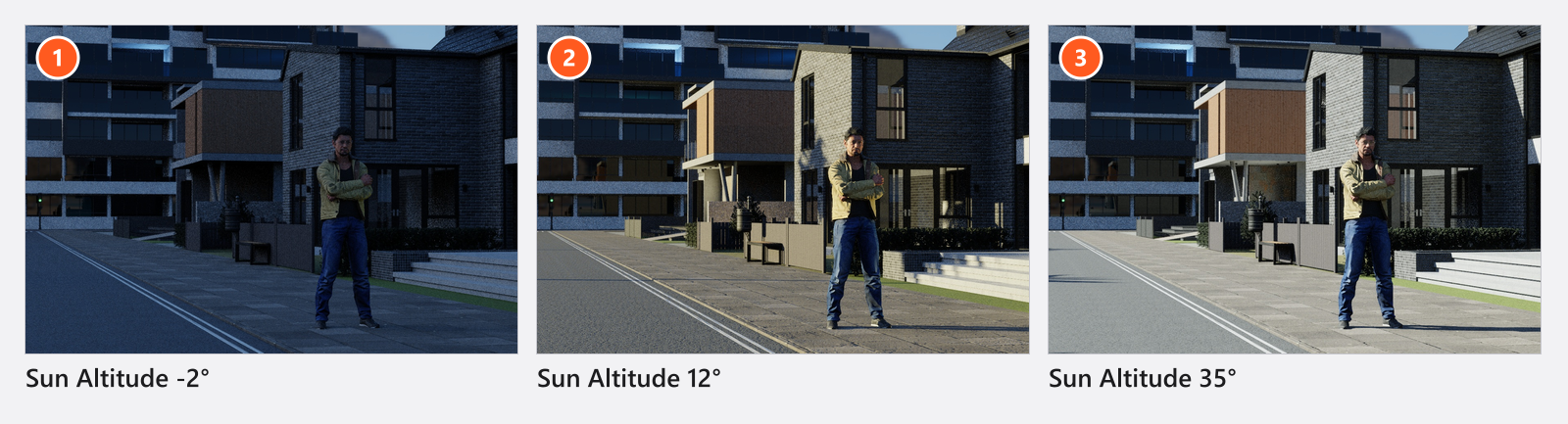
A sun that climbs at an even speed looks mechanical. Right-click the first keyframe and give it an eased interpolation — Sine, In-Out — so the movement starts and ends softly; see Shape the motion (curves and easing).
Sun Altitude and Sun Direction both run in degrees (-90° to 90°, and 0° to 360°) and are called the same in both places. Sun Brightness — the slider the inspector calls Brightness — is in stops below the sky’s own level (-10 to 0.1), and Sun Diffusion (0 to 0.2) softens the shadow edges the way a thin veil of high haze would. The full set of controls is in Light a set with the sun.
How to build haze over a shot
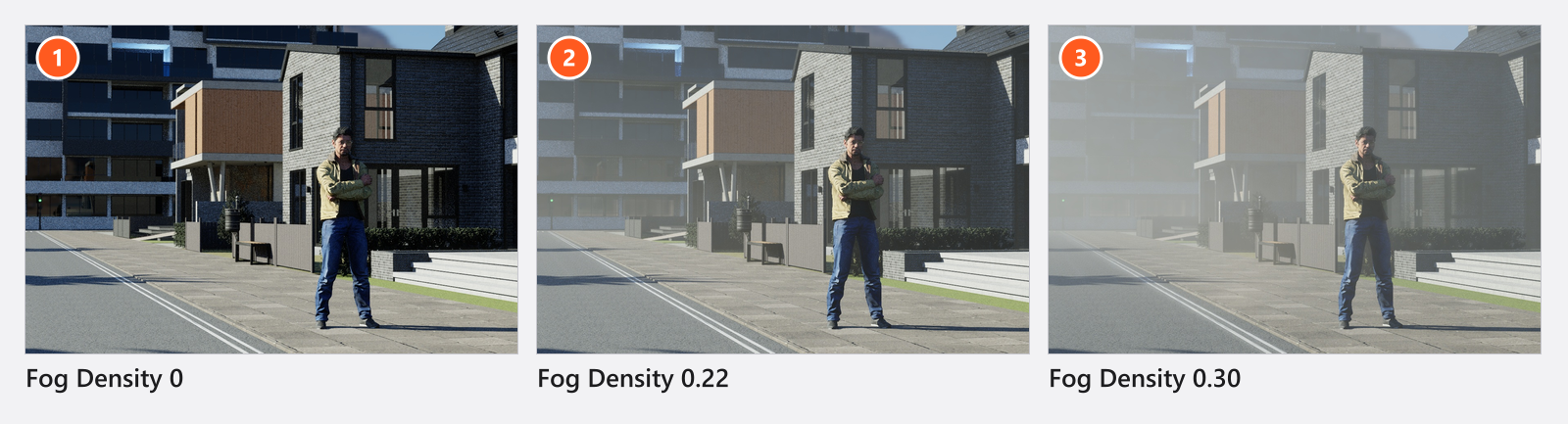
The Environment‘s Fog Density is the set-wide haze, and it runs 0 to 0.5. Key it at 0 on the first frame and at 0.1–0.2 on the last and the air thickens through the shot, which is the cheapest way to separate a model from a background over time. Everything else about it is in Fog and atmosphere.
How to animate a fog machine
A fog machine is an object from the EQUIPMENT tab that blows a plume from its nozzle instead of filling the whole set. Add it, aim it by dragging the handle in front of it, and every slider of its Settings group can be keyed.
- Select the machine and put the playhead on the first frame.
- Set Fog Density to
0and key that row. - Move the playhead to where the plume should be at its thickest, set Fog Density to
3and key it again. - Key Room Fill the same way, from
0upwards, if the fog should end up filling the room rather than staying a jet. - Play it back.
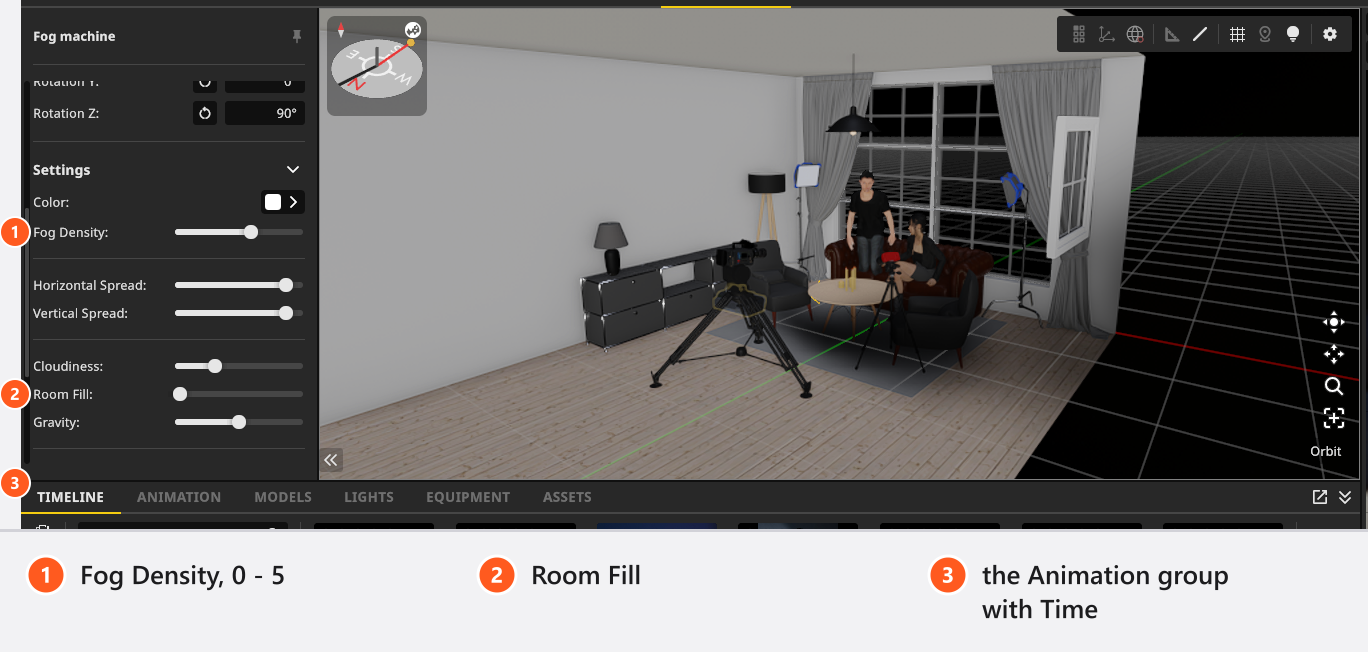
Its Fog Density runs 0 to 5 — a different scale from the environment’s 0 to 0.5. Typing 0.3 into the wrong one of the two is the most common mistake on this page: on the machine that is almost nothing, on the Environment it is dense haze.
The Time field in the machine’s Animation group offsets the fog pattern. Key it from 0 upwards over the shot and the plume drifts and curls instead of standing still; the bigger the step per frame, the faster it flows.
Environment and fog settings you can key
Environment
| Setting | Range | Default | Unit | Animatable |
|---|---|---|---|---|
| Brightness | -5 – 15 | 13 | EV | yes |
| Environmental Light | on | yes | ||
| Fog Density | 0 – 0.5 | 0 | yes | |
| North Offset | 0 | ° | yes | |
| Rotation | 0 – 360 | 0 | ° | yes |
| Sample Multiplier | 1 – 8 | 4 | no | |
| Sample Portals | 0 – 1 | 0.5 | no | |
| Sun Active | on | yes | ||
| Sun Altitude | -90 – 90 | 70 | ° | yes |
| Sun Brightness | -10 – 0.1 | 0 | yes | |
| Sun Diffusion | 0 – 0.2 | 0 | yes | |
| Sun Direction | 0 – 360 | 180 | ° | yes |
Brightness in that table is the exposure of the environment map itself, not the sun’s — the sun’s row is Sun Brightness.
Fog machine
| Setting | Range | Default | Unit | Animatable |
|---|---|---|---|---|
| Cloudiness | 0 – 1 | 0.3 | yes | |
| Color | white | yes | ||
| Fog Density | 0 – 5 | 3 | yes | |
| Gravity | 0 – 1 | 0.5 | yes | |
| Horizontal Spread | 0 – 1 | 0.9 | yes | |
| Room Fill | 0 – 1 | 0 | yes | |
| Time | 0 – 100 | 0 | yes | |
| Vertical Spread | 0 – 1 | 0.9 | yes |
The plume’s reach and its sideways lean have no numeric field: they come from the handle you drag in the studio view, which reaches from 0.5 m to 15 m in front of the nozzle.
Tips & limits
- Sun, sky and environment light are suppressed while the active camera stands in a closed room, and the switch stays on meanwhile: an animated sunrise then does nothing at all. Open a wall, or put in a window — Light a room through a window.
- Hiding a fog machine hides its fog with it, so the eye button is a way to take a plume out of one shot. Inside an animation it is not a keyable row, so key Fog Density to
0for a fade. - Only eight fog machines are rendered. With more in the set, the eight you get are not the eight you added first — delete or empty the extras.
- The HDRI itself is a keyable row, so a shot can change the whole sky mid-move. It is a hard switch, not a dissolve.
- Haze is part of the exposure: raising either Fog Density lifts the black level, so check the frame at the end of the ramp before you render, see Render a video.
Troubleshooting
- The animated sunlight does nothing. The active camera is inside a closed room.
- The fog machine barely shows. Its Fog Density is on the environment’s scale. On a machine,
3is the default and0.3is nearly invisible. - More symptoms: Animation problems.