
 English
 Deutsch
 日本語
日本語 简体中文
简体中文 Français
The render resolution is the long edge of the finished image in pixels. The other edge follows from the framing of the camera, so you choose the size once and it fits every shot in the project. Five fixed values are offered; there is no field for a free pixel number.
Applies to BASIC, STUDIO, CINEMA · The 3840 px entry needs STUDIO or CINEMA.
Where to find it
RENDER tab → the gear in the bottom toolbar → Resolution. The same list is part of the Render Image dialog, so you can change the size right before starting a batch. The default is 1200 px.
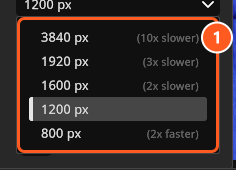
1200 px selectedThe five sizes
Render resolutions
| Resolution | Long edge in pixels | Available in |
|---|---|---|
| 800 px | 800 | BASIC, STUDIO, CINEMA |
| 1200 px | 1200 | BASIC, STUDIO, CINEMA |
| 1600 px | 1600 | BASIC, STUDIO, CINEMA |
| 1920 px | 1920 | BASIC, STUDIO, CINEMA |
| 3840 px | 3840 | STUDIO, CINEMA |
With a BASIC licence the list offers the four values up to 1920 px, and that is also the largest image BASIC renders — a bigger size stored under another licence is not used. 3840 px appears, and applies, with a STUDIO or CINEMA licence. See BASIC, STUDIO and CINEMA compared.
How the second edge is calculated
The value you pick is the long edge. The short edge is the long edge divided by the aspect ratio of the camera, and a camera in portrait orientation swaps the two.
| Camera framing | At 1920 px, landscape |
At 1920 px, portrait |
|---|---|---|
| 3:2 | 1920 × 1280 | 1280 × 1920 |
| 4:3 | 1920 × 1440 | 1440 × 1920 |
| 16:9 | 1920 × 1080 | 1080 × 1920 |
| 1:1 | 1920 × 1920 | 1920 × 1920 |
(STUDIO+) On a film camera the Anamorphic factor widens the framing and is part of the same arithmetic, because it multiplies the aspect ratio:
| Camera framing | Effective ratio | At 1920 px, landscape |
|---|---|---|
4:3 with Anamorphic 1.33x |
1.78 | 1920 × 1080 |
16:9 with Anamorphic 2x |
3.56 | 1920 × 540 |
Sensor, framing and the anamorphic factor all live on the camera bar above the preview — see The photo camera and Film camera.
What a step costs
Render time follows the pixel count, and the pixel count grows with the square of the long edge. Going from 1920 px to 3840 px uses four times as many pixels; going from 1600 px down to 800 px uses one quarter.
The list does that arithmetic for you: beside each entry it prints an estimate such as 4x slower or 2x faster. Two things to know about it:
- It compares against the value that is selected right now, so every hint changes as soon as you pick a different size.
- It only appears when the difference is bigger than a factor of 1.5, which is why neighbouring sizes often show nothing.
The hint is pixel arithmetic, not a measurement. What a size really costs you depends on the set, the quality level and the graphics card.
How large it prints
At 300 dpi — the usual assumption for a printed page — the long edge covers:
| Resolution | At 300 dpi |
|---|---|
800 px |
6.8 cm · 2.7 in |
1200 px |
10.2 cm · 4.0 in |
1600 px |
13.5 cm · 5.3 in |
1920 px |
16.3 cm · 6.4 in |
3840 px |
32.5 cm · 12.8 in |
For a full-page print, or for cropping into the picture afterwards, use 3840 px — see Large and print-ready renders (4K).
What the resolution does not change
The lighting is the same at every size: your light shapers, distances and exposure do not care how many pixels you ask for. What does change is the detail that survives, which is the whole point of a large render.
The camera preview is not affected either. It takes its pixel size from its own viewport and the camera framing, so a bigger window makes a slower preview while Resolution makes no difference to it at all.
One exception is worth knowing: in a set with five people or more, the automatic detail level of hair and eyebrows is chosen against the height of the output image. A crowd shot can therefore look slightly different at 800 px and at 3840 px. Check such a shot at the size you deliver.
Tips & limits
- Resolution is a program setting, not part of the shot: it applies to the next render, not to images you have already made.
- To get an existing shot at another size, change Resolution and render the shot again. The new JPG replaces the old one under the same shot title.
- Five values are the whole list. There is no free pixel entry and no way to render a different aspect ratio than the camera’s.
- If
3840 pxwas selected earlier and the licence later becomes BASIC, the entry leaves the list and stops being used: the render comes out at1920 pxon the long edge. Your stored choice is kept, so it is offered again after an upgrade. - Work at
800 pxor1200 pxwhile you build the light and switch to the delivery size for the final pass; the workflow is in Large and print-ready renders (4K).
Troubleshooting
- The image came out at the wrong size, or a picture changed although only the size changed. → Render problems
- A large render takes too long. → Make it faster