
 English
 Deutsch
 日本語
日本語 简体中文
简体中文 Français
Switch a camera to Film and it stops talking like a stills body: apertures read as T-stops, a Framerate appears, and you set the exposure with a Shutter Angle the way you do on a cine camera. Everything else — sensor, format, lens, ISO, ND filter, white balance, focus — behaves exactly as described in The photo camera. If you are looking for the cinema camera, this is the page.
Applies to STUDIO, CINEMA · With a BASIC licence the Film button is switched off and the film bodies and film rigs are not offered in the pickers · You need: a camera in the set, selected, with its inspector open.
Where to find it
Select the camera and open the Settings group in the inspector. The first row is the Photo / Film pair.
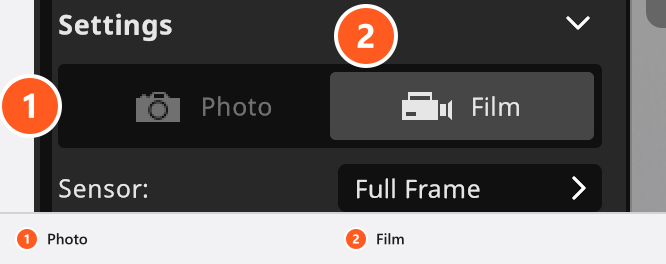
Picking a film body under Equipment → Camera gets you there in one step: choosing a body applies its type, its sensor and its format together.
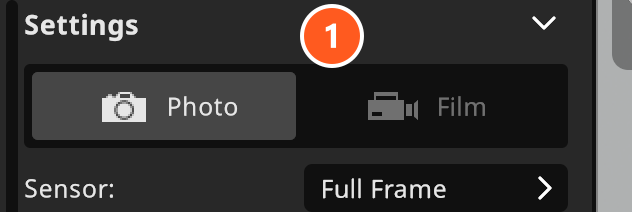
What changes in Film mode
| Control | Photo | Film |
|---|---|---|
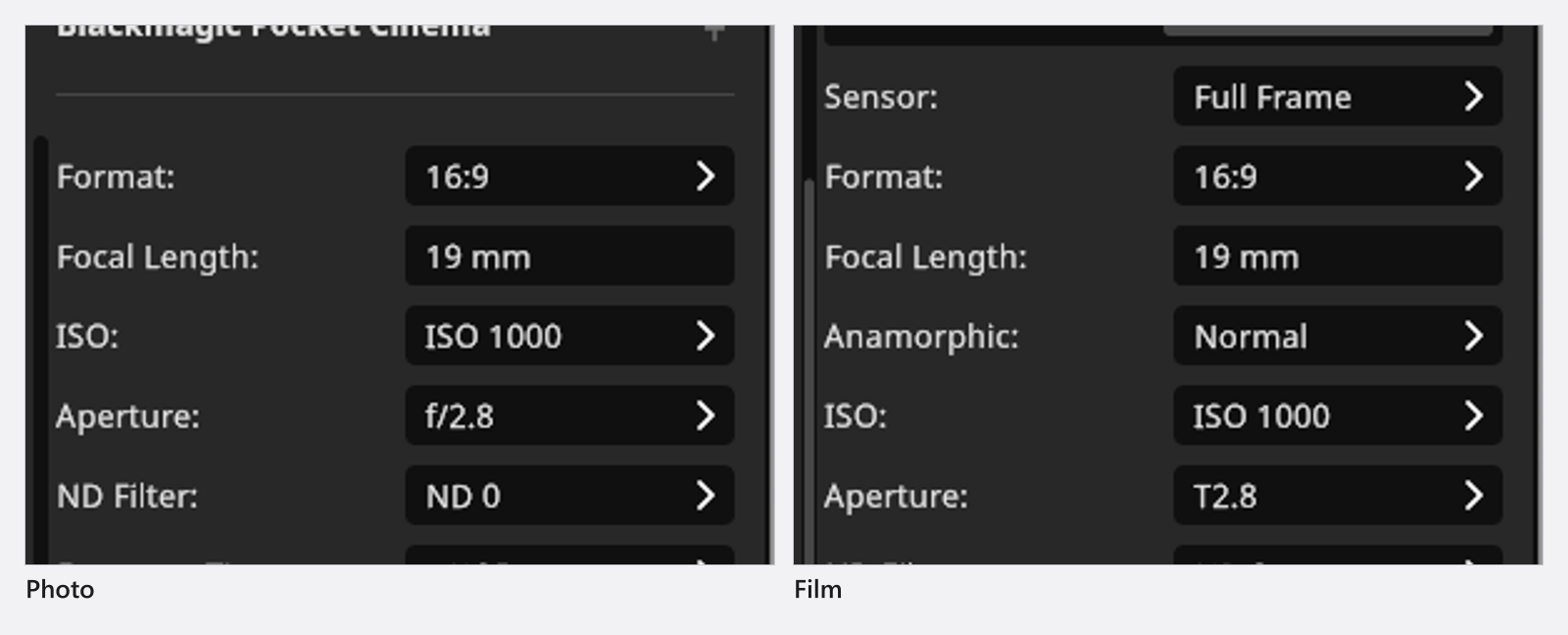
| Aperture | f-stops, f/0.5 … f/32 |
the same 33 steps labelled as T-stops, T0.5 … T32 |
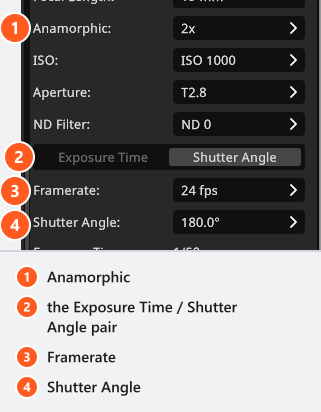
| Anamorphic | hidden | Normal, 1.3x, 1.33x, 1.42x, 1.5x, 1.75x, 1.8x, 2x (default Normal) |
| Framerate | hidden | 19 steps, 16 fps … 2000 fps (default 30 fps) |
| Exposure | Exposure Time only | a pair of buttons chooses Exposure Time or Shutter Angle (Shutter Angle is preselected) |
| Shutter Angle | hidden | 19 steps, 5.0° … 360.0° (default 180.0°) |
The aperture ladder itself does not change — f/2.8 and T2.8 are the same setting under two names. The three film-only dropdowns also appear in the camera bar above the preview, between the lens and the aperture.
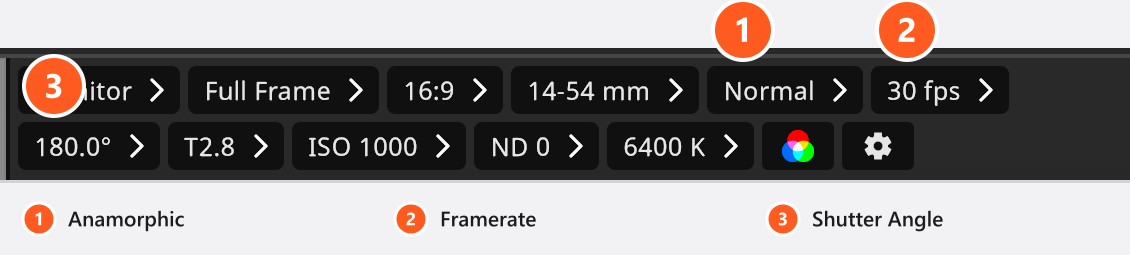
Framerate
Nineteen steps, from the silent-era rates to high speed:
16 fps · 16 2/3 fps · 18 fps · 20 fps · 23.98 fps · 24 fps · 25 fps · 29.97 fps · 30 fps · 48 fps · 50 fps · 59.94 fps · 60 fps · 120 fps · 240 fps · 400 fps · 800 fps · 1000 fps · 2000 fps
This Framerate belongs to the camera: it sets how long one film frame is exposed, and it is printed on the set plan. It does not decide how many frames per second an animation is played back or rendered at — that is a different field with the same name, in the animation editor, and it runs from 2 to 120 fps. See How animation works in a shot.
Shutter angle or shutter time
The angle is the part of a full turn during which the shutter is open, so the exposure follows the framerate: 180.0° is half a turn, and half of 1/24 s is 1/48 s.
| Shutter Angle | at 24 fps |
at 25 fps |
at 30 fps |
|---|---|---|---|
90.0° |
1/96 s | 1/100 s | 1/120 s |
180.0° |
1/48 s | 1/50 s | 1/60 s |
360.0° |
1/24 s | 1/25 s | 1/30 s |
The ladder is deliberately irregular, and six of its steps are the ones a cine shooter looks for: 45.0° and 90.0° for a crisp, staccato exposure, 172.8° as the flicker-free angle for 24 fps under 50 Hz light (it works out at exactly 1/50 s), 180.0° as the everyday standard, and 270.0° and 360.0° when a frame should be exposed for most or all of its own duration.
Below the angle, the Exposure Time row turns into a read-out, and it names the nearest step of the photographic shutter ladder rather than the time the camera uses: 180.0° at 24 fps is 1/48 s and is reported as 1/50 s. The preview and the render both expose for the calculated value. Nothing warns you when the two differ.
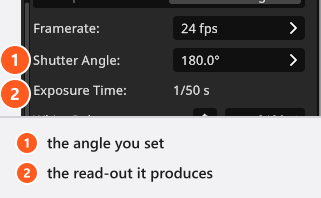
In practice that means: leave 180.0° on for the everyday 24 fps look, and switch to 172.8° when the room’s own practicals run on 50 Hz mains and you want the plan to match what the camera will do on the day.
Switch the pair to Exposure Time and you choose the time yourself. The camera then exposes for the shorter of the two values, your time or one whole frame: 1 s at 24 fps still exposes 1/24 s.
Studio flash is integrated over its own flash duration, so the shutter hardly changes it, while continuous light reacts to it directly — the details are in Set the exposure.
Anamorphic
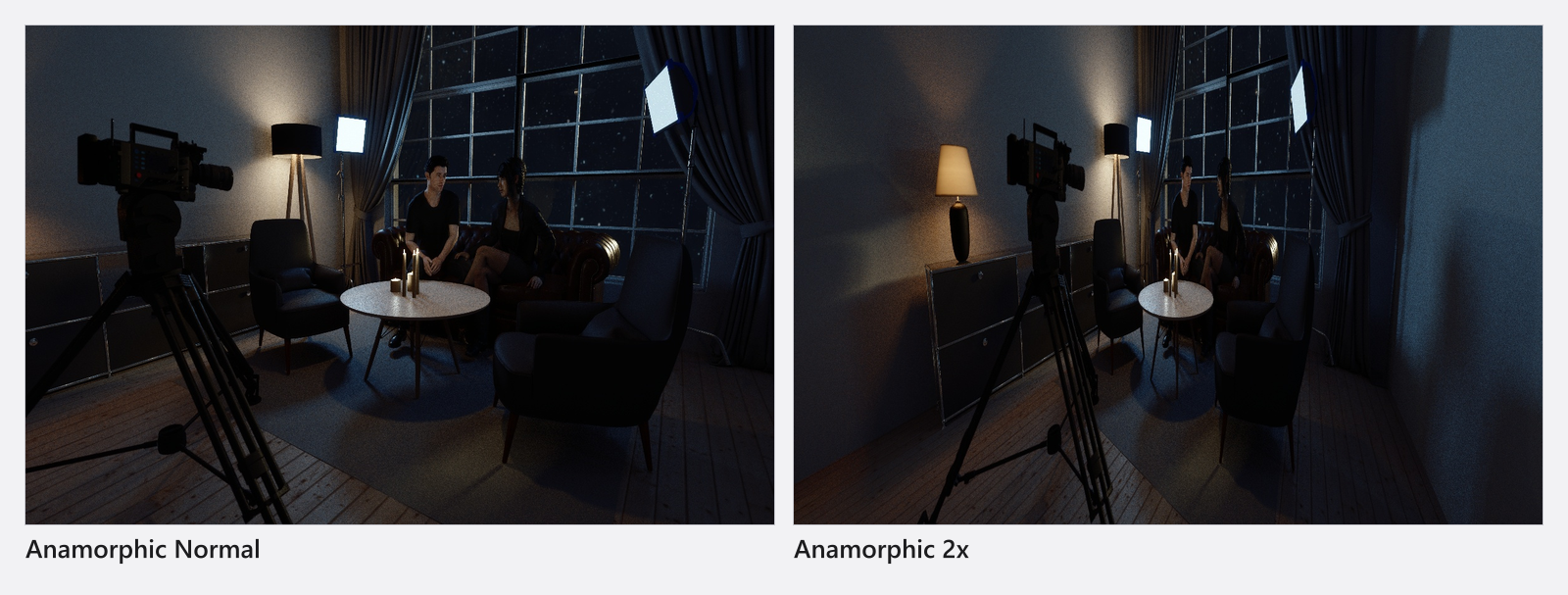
Anamorphic multiplies the frame’s aspect ratio: with 2x the camera frames twice as wide as the Format alone would. The camera preview, the final render, the frames of an exported video and the automatic focus all use that widened frame, and the PLANS pages print the factor next to the lens.
It changes the framing and nothing else. There is no squeezed image, no oval bokeh and no anamorphic flare, and the setting has no effect while the camera is in Photo mode.
Film bodies and rigs
Four film bodies ship in the library, all of them with a full-frame recording area:
| Body | Sensor | Format |
|---|---|---|
| Blackmagic Pocket Cinema | Full Frame | 3:2 |
| Blackmagic URSA | Full Frame | 3:2 |
| Film Camera | Full Frame | 16:9 |
| RED KOMODO | Full Frame | 3:2 |
The film rigs are Film Tripod, Camera Crane, Dolly and Fisher 10; their axes and limits are listed in Camera rigs: axes and limits. You can add your own film bodies and mounts on top of them — see Set up your own camera kit.
All five bodies in the library, the Photo Camera included:
Cameras
| Name | Type | Key facts |
|---|---|---|
| Blackmagic Pocket Cinema | Film | Full frame sensor, 3:2 aspect ratio |
| Blackmagic URSA | Film | Full frame sensor, 3:2 aspect ratio |
| Film Camera | Film | Full frame sensor, 16:9 aspect ratio |
| Photo Camera | Photo | Full frame sensor, 3:2 aspect ratio |
| RED KOMODO | Film | Full frame sensor, 3:2 aspect ratio |
What you can animate
Framerate, Shutter Angle, the Exposure Time / Shutter Angle switch and Anamorphic all take keyframes (add-on: Animation Tool). The camera type itself does not, so a shot is either a photo camera or a film camera for its whole length.
Tips & limits
- Movement is not blurred. The angle changes the exposure, not the rendering of motion, so a
360.0°shutter comes out as sharp as a5.0°one. - The ND Filter is available in both modes. It is the usual way to work at
T2.0under continuous light without blowing the image out. - On a set plan a film camera prints its shutter angle and its framerate instead of a shutter time, plus the anamorphic factor when one is set.
Troubleshooting
- The exposure time under my shutter angle looks wrong. It is the nearest step of the photographic ladder, not the value the render uses; the render uses the exact angle.
- More symptoms, including the greyed-out Film button, are in Camera problems.