English
 Deutsch
 日本語
日本語 简体中文
简体中文 Français
Every number on this page was read from the build of release 3.1.14. It answers what a base model can do, what a slider accepts, and how many garments and poses ship — the facts the task pages quote but do not repeat.
Applies to BASIC, STUDIO, CINEMA · Models are not gated by edition or add-on: every edition offers the same eight base models with the same options.
Base models and ready-made models
Eight base models ship, and 30 library entries are built on them. A library entry is its base model with a height, a body shape, a skin, an eye colour, a hairstyle, makeup and an outfit already chosen. Which base model an entry belongs to matters, because face and body mixing, exchanging and the pose groups all work inside one base model.
| Base model | Kind | Library tag | Entries built on it |
|---|---|---|---|
| Victoria | adult | Women | Victoria, Alexandra, Amy, Diane, Jessica, Karen, Kathy, Kim, Kira, Linda, Mai, Melanie, Pria, Xia, Yuna (15) |
| Mike | adult | Men | Mike, Hasan, Hiroshi, Jamal, Max, Ranjid, Robert, Thomas (8) |
| Sarah | child | Children | Sarah (1) |
| Lucas | child | Children | Lucas, Denzel (2) |
| Toddler | child | Children | Toddler (1) |
| Cat | animal | Animals | Cat (1) |
| Dog | animal | Animals | Dog (1) |
| Horse | animal | Animals | Horse (1) |
What each family can do
A styling group is only built when the family has something to put in it, which is why the inspector looks different from model to model. A dash means the group does not appear at all.
| Victoria | Mike | Sarah | Lucas | Toddler | Cat | Dog | Horse | |
|---|---|---|---|---|---|---|---|---|
| Hair entries | 48 | 30 | 23 | 20 | 3 | — | — | — |
| Beard entries | — | 6 | — | — | — | — | — | — |
| Eyebrow entries | 21 | 8 | 21 | 7 | — | — | — | — |
| Eye colours | 14 | 14 | 14 | 14 | 12 | 4 | 9 | — |
| Skin variants | 16 | 8 | 6 | 3 | 3 | 5 | 2 | 4 |
| Makeup entries | 22 | — | — | — | — | — | — | — |
| Glasses entries | 18 | 11 | 18 | 11 | — | — | — | — |
| Face-shape mixers | 15 | 8 | 2 | 2 | — | — | — | — |
| Body-shape mixers | 8 | 2 | 1 | 1 | — | — | — | — |
| Outfits | 50 | 28 | 11 | 9 | 2 | 1 | 1 | — |
| Facial expressions | yes | yes | yes | yes | yes | — | — | — |
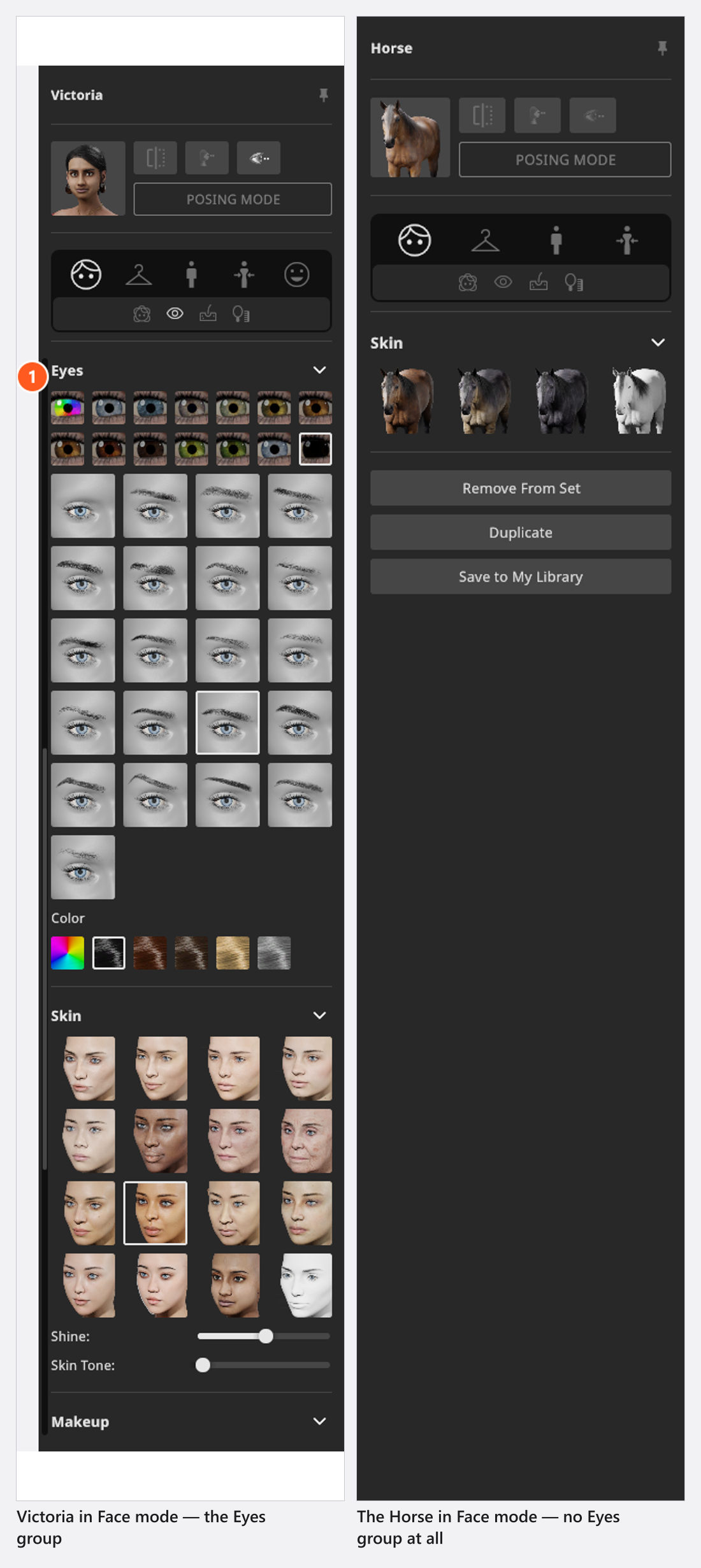
Three readings of that table are worth stating plainly. Every list that can be switched off contains one none entry — the hair lists start with a bald entry, the glasses lists with a “no glasses” entry, and Mike‘s six beards include “no beard” — so the number of wearable items is one lower than the count. The Eyes group needs more than one eye colour to exist: the Horse has exactly one, so it shows no eye-colour control at all. And the Outfits row counts complete outfit presets, not the single garments a family can wear.
The Toddler has no face or body mixing and no glasses. The Cat has one collar in its Accessories group and the Dog two, and neither has anything else to wear; the Horse has no wardrobe. Animals have no hair, no makeup and no facial expressions.
Body proportions
The lower of the two groups called Body in the Body Shape mode. Size is the height of the model and the only one of these that can be animated.
| Setting | Range | Default | Notes |
|---|---|---|---|
| Size | no fixed limits | the model’s own height | Type a value or drag the label; it follows your Unit of Measurement setting. The field is Size in the inspector and appears as Height in the animation editor |
| Weight | -1 … 1 |
0 |
Thin to full |
| Pregnant | 0 … 1 |
0 |
Only on models that offer it |
| Muscular | 0 … 1 |
0 |
Only on models that offer it |
| Arms, Breasts, Chest, Abdomen, Pelvis, Legs | 0.67 … 1.5 |
1 |
The size of that region; there is no waist field |
There is no scale field for a model. The mixing sliders above these fields run 0 … 1 each and are mixed freely.
Skin, hair, makeup and glasses
Shine is bounded by the base model, so its slider does not reach the same values on every family, and the Cat also starts from a different value.
| Base model | Shine range | Default |
|---|---|---|
| Victoria | 0.17 … 1 |
0.6 |
| Mike | 0.18 … 0.93 |
0.6 |
| Sarah | 0.16 … 1 |
0.6 |
| Lucas, Toddler | 0 … 1 |
0.6 |
| Cat | 0 … 1 |
0.14 |
| Dog, Horse | 0 … 1 |
0.6 |
Skin Tone runs from 0 to one less than the number of complexion variants the selected skin carries, so it needs at least two of them and is absent below that. On the unpainted skin a Skin Color field takes its place; on any other skin without variants nothing does, which is the state of every painted animal skin.
Skin
| Setting | Range | Default | Unit | Animatable |
|---|---|---|---|---|
| Shine | depends on the model | depends on the model | no | |
| Skin Color | white | no | ||
| Skin Tone | from 0 | depends on the model | no |
Hair
| Setting | Range | Default | Unit | Animatable |
|---|---|---|---|---|
| Hat Color | depends on the model | no |
Make-up
| Setting | Range | Default | Unit | Animatable |
|---|---|---|---|---|
| Lipgloss | 0 – 1 | depends on the model | no | |
| Lips | depends on the model | no | ||
| Nails | depends on the model | no |
Glasses
| Setting | Range | Default | Unit | Animatable |
|---|---|---|---|---|
| Color | depends on the model | no |
Hands and feet
The sliders in the Hands and Feet groups of the Pose mode. Every row has a left and a right slider. All values are angles in degrees except where the table says otherwise.
| Row | Range | Unit |
|---|---|---|
| Finger Fold, Finger Pitch | -5 … 100 |
° |
| Finger Spread | -0.5 … 0.5 |
factor, not an angle |
| Thumb Fold, Thumb Pitch | -10 … 120 |
° |
| Thumb Spread | -20 … 40 |
° |
| Grab | 0 … 100 |
— |
| Index Fold, Middle Fold, Ring Fold, Pinky Fold | -5 … 100 |
° |
| Index Pitch, Middle Pitch, Ring Pitch, Pinky Pitch | -5 … 100 |
° |
| Index Spread, Middle Spread, Ring Spread, Pinky Spread | -10 … 10 |
° |
| Toes Pitch | -90 … 90 |
° |
On the spread rows — the thumb and the four single fingers — the left slider runs inverted, so that equal values mirror each other instead of pushing both hands the same way. The value a row starts from depends on the pose, not on the model, so a fresh preset pose rarely sits at zero.
Facial expressions
The Facial Expression mode has five emotion sliders, Happy, Sad, Angry, Surprised and Disgusted, each 0 … 4 and mixable. Below them are 30 named rows for the single facial muscles, each 0 … 1. Fourteen of those rows are split into a left and a right slider, which is why the panel holds 44 sliders in total.
The bundled expression groups are Happy, Sad, Angry, Disgusted, Scared, Surprised and Various for the adults, and five of them — without Scared and Various — for the children. Animals have none.
Poses and motion clips
Preset poses belong to a model type, not to a model name, so a group made for an adult is never offered on a child or an animal. As shipped in 3.1.14:
| Group | Adults | Children | Animals |
|---|---|---|---|
| Standing | 59 | 47 | 1 |
| Sitting | 27 | 25 | 0 |
| Lying | 17 | 15 | 0 |
Those are the group headers in the panel. The sub-mode icons above them carry the longer tooltips Poses Standing, Poses Sitting and Poses Lying.
45 motion clips ship for the Animation Tool. The clip browser offers all of them on every model without filtering, so whether one looks right on a child or an animal is a matter of trying it (add-on: Animation Tool).
Garments and accessories
276 garments and accessories ship, in 12 collections. The inspector builds 13 groups from them, because the two Rings groups share one collection.
| Group | Pieces in its collection |
|---|---|
| Top | 64 |
| Pants | 58 |
| Shoes | 38 |
| Overall | 35 |
| Jacket | 28 |
| Accessories | 14 |
| Earrings | 10 |
| Neck | 9 |
| Gloves | 7 |
| Socks | 5 |
| Bracelets | 5 |
| Rings (two groups) | 3 |
Which of them a group offers depends on the base model, so the numbers above are the size of the collection and not the length of the list you see. Prevent Overlap runs 0 … 0.1 and exists on Overall, Top and Pants only. Shine and Transparency take their bounds from the active garment and its material slot.
What can be animated
On a model, only the height — Size in the inspector, Height in the animation editor — the pose and an animation clip carry keyframes. Styling, wardrobe and facial settings do not — but a key on the pose track stores the facial expression together with the bones, so an expression change can be animated through a pose key (add-on: Animation Tool). The complete list is in What can be animated.
Detail at a distance
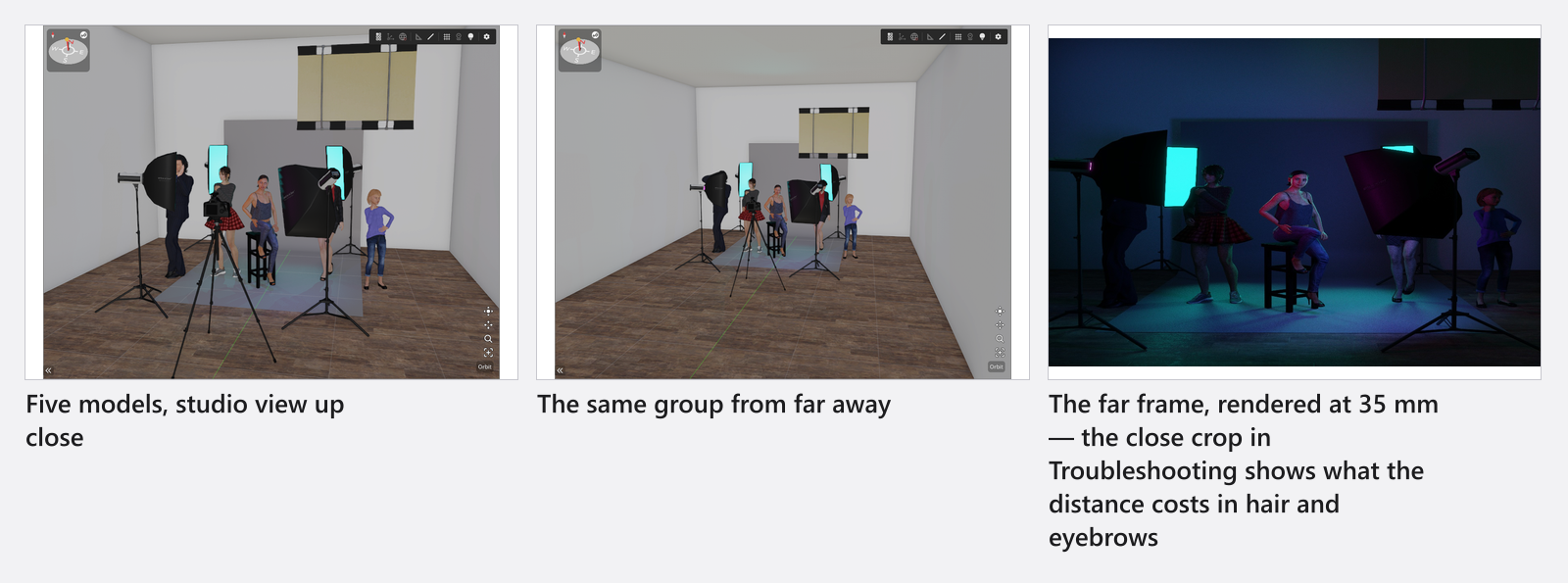
From five or more models in view onwards, hair, beard, body and clothing detail follow the size the head has on screen, and eyebrows can be dropped below roughly 40 pixels of head height and restored when the model comes closer. The final render picks its detail from the output height, so a large render gets more than the preview showed. Nothing about this is a setting.