
 English
 Deutsch
 日本語
日本語 简体中文
简体中文 Français
Attaching makes one object ride on another: a prop in a model’s hand, a speedlight on a camera, a window in a wall. The attached object keeps its own settings but follows the other one wherever it goes, and it stays attached through saving, duplicating and sharing.
What can attach to what
Attaching is a fixed matrix, not a free-for-all. These pairs are allowed and no others:
| This object … | … can attach to |
|---|---|
| Prop, imported 3D object, architectural light, picture wall, wall element, floor, basic shape | a human model |
| Light | a camera, if the light is a type that can be camera-mounted |
| Window or door | a room or a wall element |
| Camera | a dolly rail — by dragging, see below and Build a dolly track |
Animal models take nothing: only human models offer hands and a head. Anything not in the table above is never the attached object — a mirror, a reflector, a diffuser, a light meter, a background, a room, a dolly rail or a group. And nothing can be attached to an object that is hidden, because attaching would have hidden the child as well.
The mounting points
| Where it mounts | The popup’s icon says, on hover | The Attachment Point row calls it |
|---|---|---|
| A model’s head | Head | Head |
| A model’s left hand | Left Hand | Left Hand |
| A model’s right hand | Right Hand | Right Hand |
| A camera’s hot shoe | Flash Mount | Flash |
| A camera’s lens | Lens | Lens |
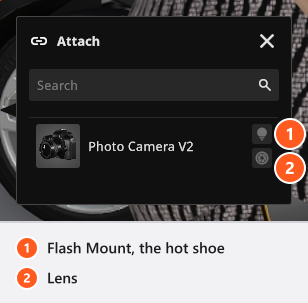
The popup offers icons rather than words, so the middle column is what a tooltip tells you when you rest the pointer on one. The two names for the hot shoe are the same point; the popup uses the longer wording, the inspector row the shorter one. Attaching starts at the point you used last, and falls back to Right Hand on a model or Flash on a camera when that point does not exist on the new target. You can change it afterwards.
The attach and detach buttons
For every pair but the camera, the two buttons sit in the object controls beside the selected object (0 shows them if they are hidden).
- The Attach to another object button opens a popup headed Attach, listing every valid target in the set. Each row of a model carries three icon buttons for head and hands; each row of a camera carries two, for the hot shoe and the lens. Click the target, or click the icon for the point you want.
- The Detach from object button next to it releases the object again. It only appears while the object is attached.
A camera has no attach button. It goes onto a dolly rail by being dragged: drag the camera over a rail in the studio view and it rides on that rail, drag it off the rail and it is loose again.
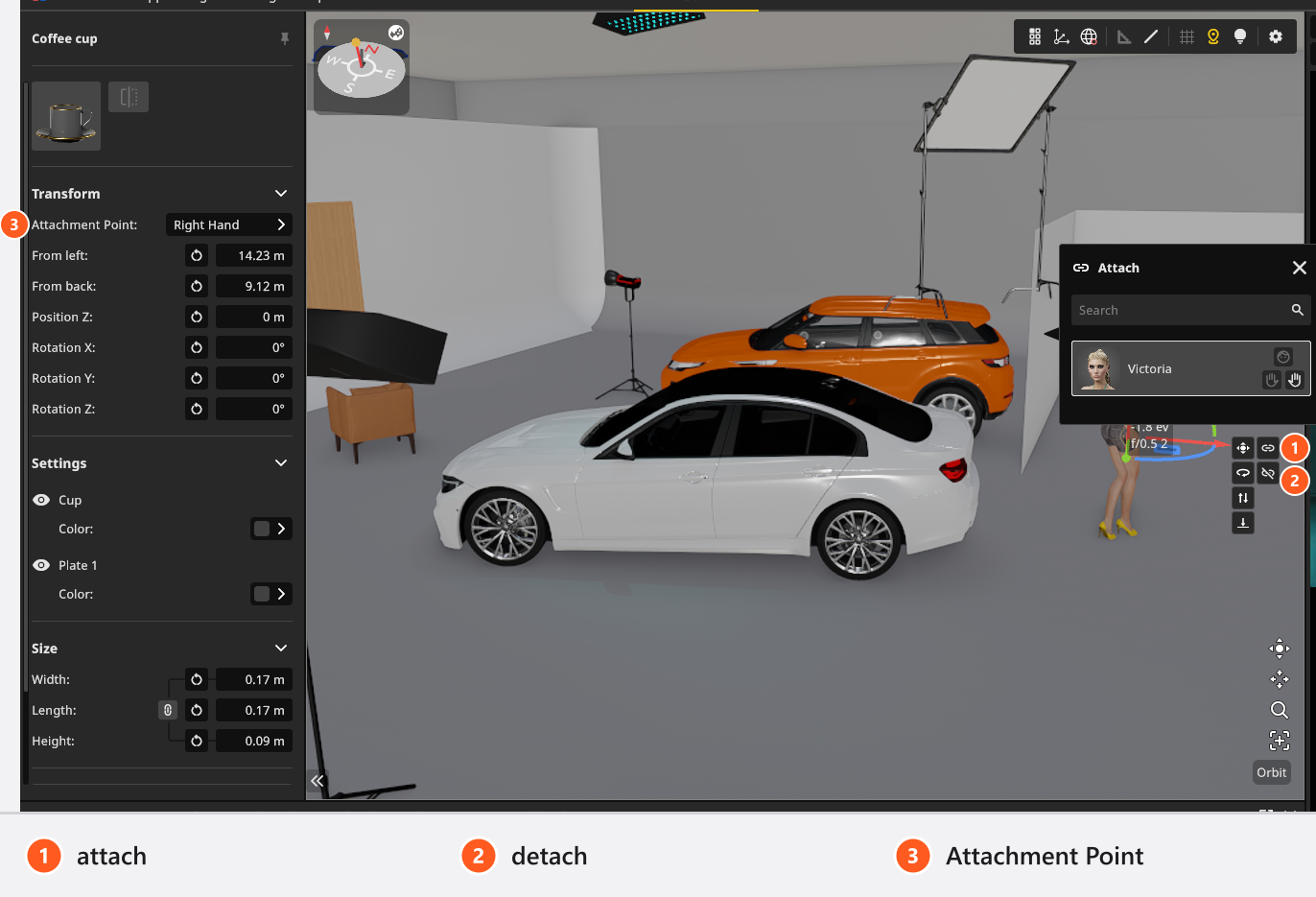
The object will jump. Attaching sets its position and rotation to zero at the mounting point, so it lands exactly on the hand, the head or the shoe, wherever it was standing before. That is intended: place it afterwards, with small values, relative to the mount.
Detaching puts the object back into the set beside its former parent and keeps it where it stood, with two deliberate exceptions:
- A window or a door steps 0.3 m out of the wall, so you can see that it is loose and the wall has closed.
- A light that was on a camera steps 0.2 m to the side of it and takes the camera’s rotation.
Which objects show an Attachment Point row
After attaching, some inspectors grow an Attachment Point dropdown in Transform so you can move between head and hands without detaching. Props, imported 3D objects, lights and architectural lights have it. Basic shapes, picture walls, wall elements, floors, windows and doors do not — reopen the attach popup and pick the icon there instead.
Limits
- The attach button disappears when there is no valid, visible target in the set. If you cannot see it, the intended target is hidden or is not one of the allowed types.
- Duplicate in the inspector copies one object without the things attached to it.
Ctrl+C/Ctrl+Vcopies the selection together with everything attached below it. Either way the copy keeps the animation of what was copied (add-on: Animation Tool), with its Position keys shifted to the copy’s new place. - Deleting the parent deletes what hangs off it.
- Save to My Library stores an object with everything attached below it, so a camera with its speedlight comes back as a pair.
- The relationship itself cannot be keyframed. Only the transforms of the two objects can, so a prop cannot change hands during an animation.
- An attached object is still selected, locked, hidden and measured on its own.
Troubleshooting
- The attach button is missing. A camera never has one — drag it onto the rail instead. On anything else there is no valid, visible target: unhide the target, or check the pair against the table above.
- The prop jumped to the hand and vanished into it. Its offsets were zeroed at the mounting point. Nudge it out with small position values.
- A window in a wall will not rotate. It follows the wall’s transform. Detach it first.
- The window moved when I detached it. By 0.3 m, on purpose, so you can see that it is off the wall.
More symptoms: Objects, rooms and measurement problems