
 English
 Deutsch
 日本語
日本語 简体中文
简体中文 Français
What sits in front of a head decides how the light behaves: how hard the shadow edges are, how far the light spreads, and how much of it lands on the background. In set.a.light 3D that part is called a Light Shaper — a light modifier in photographers’ words. There are 90 of them in the library, each with its own light distribution, so the one you pick changes the render the way it changes a real shoot.
Applies to BASIC, STUDIO, CINEMA · Gobo shapers need STUDIO or CINEMA · You need: a project open on the SETUP tab with a light selected.
Why a light shaper changes the light
Hardness comes from the apparent size of the source as seen from the subject, not from the wattage. The same 80 cm box is soft at one metre and hard from across the room, which makes moving the light the cheapest hardness control you have. A diffusion layer enlarges the glowing surface; a grid keeps the surface as it is but stops the light from spilling sideways, which is how you keep a background dark without touching the key.
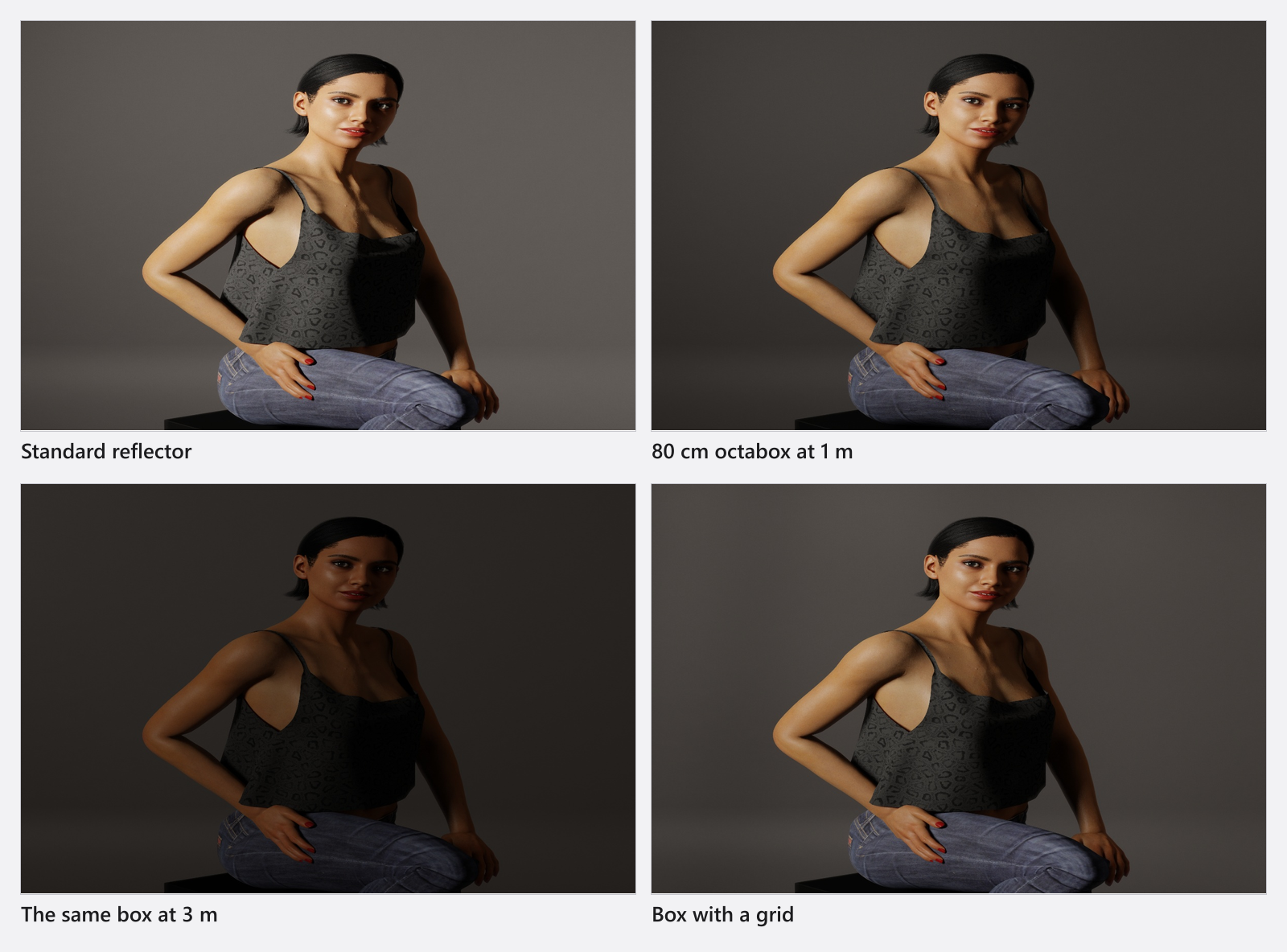
Which light shaper for which job
| For | Reach for | In the library |
|---|---|---|
| The everyday soft key | Softbox | 18 sizes from 30 × 30 cm to 100 × 100 cm, the largest 90 × 150 cm |
| Edge and rim light, full-length figures | Striplight | 15 sizes from 25 × 60 cm to 50 × 130 cm, the longest 40 × 180 cm |
| Soft key with a round catchlight | Octaform, Octabox | 11 round boxes, Ø 50–150 cm |
| Wide, forgiving, cheap light | Umbrella Trans., Umbrella W/S, Umbrella White | 12 umbrellas, Ø 85–210 cm |
| Beauty and portrait key | Beauty Dish and its white and silver versions | 4 dishes, Ø 40–56 cm |
| Crisp, focused soft light | Parabolic, Parabolic – Inverse | 4 dishes, Ø 90 and 120 cm |
| Hard light, background wash | Reflector | 7 standard reflectors, Ø 18–34 cm |
| A spot, an accent, a film look | Snoot, Accent Tube, Fresnel, Lantern, Light Dome II, Light Dome Mini II, Light Box, Diffuser Sphere, Backlight Reflector | 14 specials |
| A lit background for high-key | Hilite | 3 sizes, up to 215 × 250 cm |
| A projected pattern or image | Gobo – Projector, Light Blaster | see Project a pattern or an image |
Every entry with its size, variants and mount: Light shaper catalogue.
How to fit a shaper to a head
- Select the light in the studio view or in the set list.
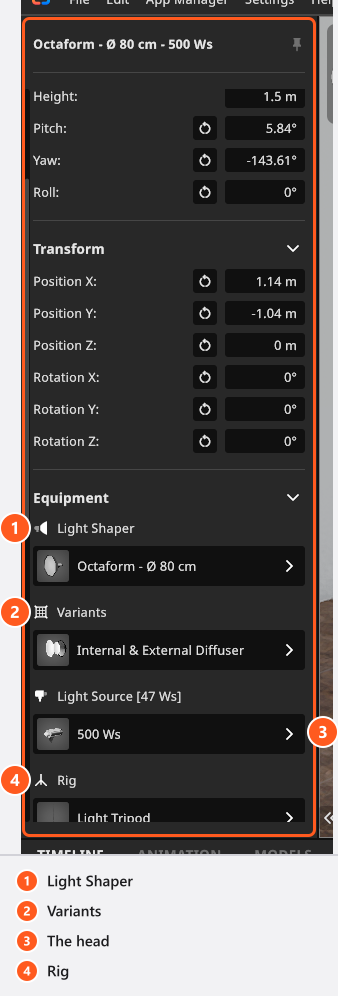
- In the Equipment group of the inspector, click the button under Light Shaper.
- Pick an entry from the list, or No Lightshaper to work with the bare head. → The shaper is fitted immediately and the picture updates.
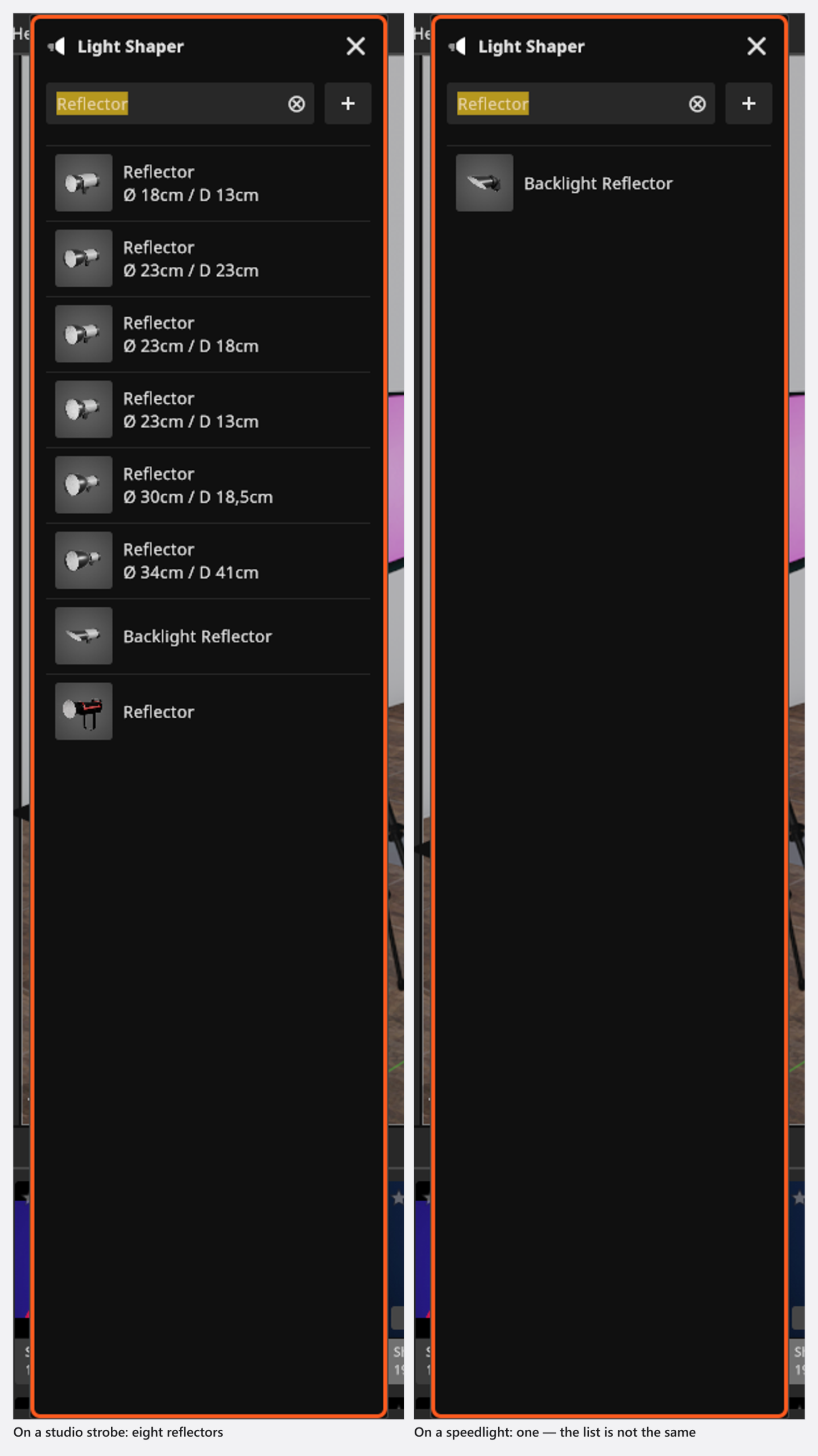
The list only offers what fits the head that is on the light: each shaper carries a mount — flash bayonet, speedlight, or the Bowens-style mount of the continuous fixtures — and everything else is hidden rather than greyed out. Two consequences to expect: 45 of the 90 shapers fit all three mounts, while 21 of them are speedlight-only and never appear on a studio strobe, the Light Blaster among them. Change the head afterwards and the list is filtered again.
You can also drag a shaper out of the library straight onto a light that is already standing; see Add and place lights for what that keeps and when it places a second light instead.
Which head and which stand a shaper arrives with when you drag it in is set once, in the App Manager. From 00:52 the App Manager tutorial opens that page — Light Shapers → Defaults — and picks the pair every new shaper should bring:
How to change the variant
Most shapers ship in several build states, listed under Variants right below the shaper. The row only appears when the fitted shaper has more than one:
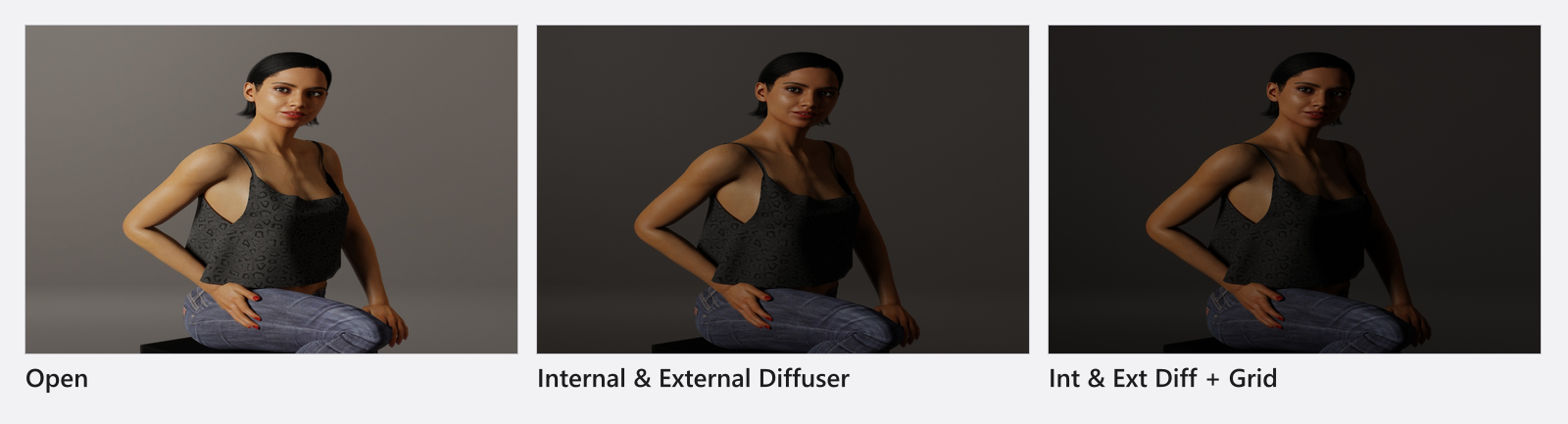
- Open — nothing fitted, the hardest version of that shaper
- Internal Diffuser, External Diffuser, Internal & External Diffuser — one or both diffusion layers
- Grid and Int & Ext Diff + Grid — honeycomb grid, for soft light that does not spill
- Grid No. 1 | 10° to Grid No. 4 | 40° — the graded grids of the reflector series
- Black/White, Black/Silver, Translucent — the skins of the umbrellas
- Open with Deflector, Vertical, Horizontal, Standard — what a particular family adds
Each variant has its own light distribution, so a gridded softbox really is narrower than the open one, and each diffusion layer costs light you have to put back on the dimmer.
Tips & limits
- Sizes are not edited on a standing light. If your own light shaper sits between two catalogue sizes, build it once as a sized copy — see Add your own lights and light shapers.
- A second Variants row appears under the head on the eleven fixtures that ship in more than one version (another wattage, a bi-colour version, the shapes of a tube light).
- Gobo shapers are not in the library in BASIC. The Light Blaster is, but it mounts on a speedlight only.
- Softening, bouncing and flagging light away from the fixture is a different set of tools: Soften, bounce and subtract light.
Troubleshooting
- The list is shorter than my colleague’s. Three things shorten it: the mount of the head that is fitted, entries hidden in the App Manager, and the edition (no gobos in BASIC).
- A grid made the picture darker but not narrower. Check the Variants row — a graded grid of the reflector series behaves differently from a softbox grid.
- More symptoms: Lighting problems.