
 English
 Deutsch
 日本語
日本語 简体中文
简体中文 Français
A model has more controls than any other object on the set, and several of them depend on a state or on the family you picked. This page names the state behind each symptom, so you can stop looking for a setting that is not there.
The model will not move
Cause. One of three states: the row is locked in the set list, the object is hidden, or it is attached to another object and follows that one.
What to do. Check the set-list row first — a locked selection reports Objects are locked when you try to transform it, and L (by default) toggles the lock. Then check visibility, and finally the attachment: an attached model is moved by moving what it hangs on, or by detaching it. See The set list and the timeline and Attach one object to another.
The model will not pose
Cause. Either nothing is selected — posing acts on the selected model — or the model is still loading. A model dropped a moment ago needs time before its body is there to pose.
What to do. Select the model in the set list or the studio view and wait until it is fully drawn, then pose it. See Pose a model.
The head will not move by hand
Cause. Rotate Head Towards Camera is on, and it takes the head over.
What to do. Switch it off to set the head angle yourself. Where the model looks is covered in Where the model looks.
The hand travels with the body although the pin is off
Cause. The pin means this hand follows the body, and switching it off does not detach the hand from the arm — it changes how the hand is driven, not whether it belongs to the model.
What to do. Pose the arm to move the hand where you want it. There is no state in which a hand stays behind while the model walks off.
Undo does not bring a finger slider back
Cause. The finger and toe rows of the Hands and Feet groups are outside the undo history. Dragging one records no step, and neither does its right-click reset — which works on both columns, each on its own.
What to do. Type or drag the value back, or right-click the row to zero it. For the same reason these rows get no automatic keyframe while recording: key the pose instead, which stores every bone in one go.
A group is missing from the model’s inspector
Cause. The groups follow the family. Not every family has every option: an animal has no expressions, and some human families have no makeup or no eye options of their own.
What to do. Check the family you picked against Model reference: families and settings, and swap the model for one that carries the group you need. A preset can only be exchanged within its own base model, so a swap across families means adding a new model and deleting the old one.
The attach button is missing
Cause. Attach to another object. appears only when there is a valid, visible target in the set.
What to do. Make the target visible, or place the object you want to attach to first. See Attach one object to another.
A clothing slider will not reach its end
Cause. Each garment sets its own bounds for the sliders that shape it. The slider is not broken; that garment does not go further.
What to do. Pick a different garment if you need the extreme, and check whether a second layer is fighting the first — hiding a layer is the usual way out. See Dress a model.
Models in the background have less hair and eyebrow detail
Cause. From five loaded, visible models the program chooses hair and body detail by itself, from how large each head is on screen. A model far from the camera gets a coarser level, and eyebrows disappear below a small size. The same choice is made in a final render, where it follows the output size.
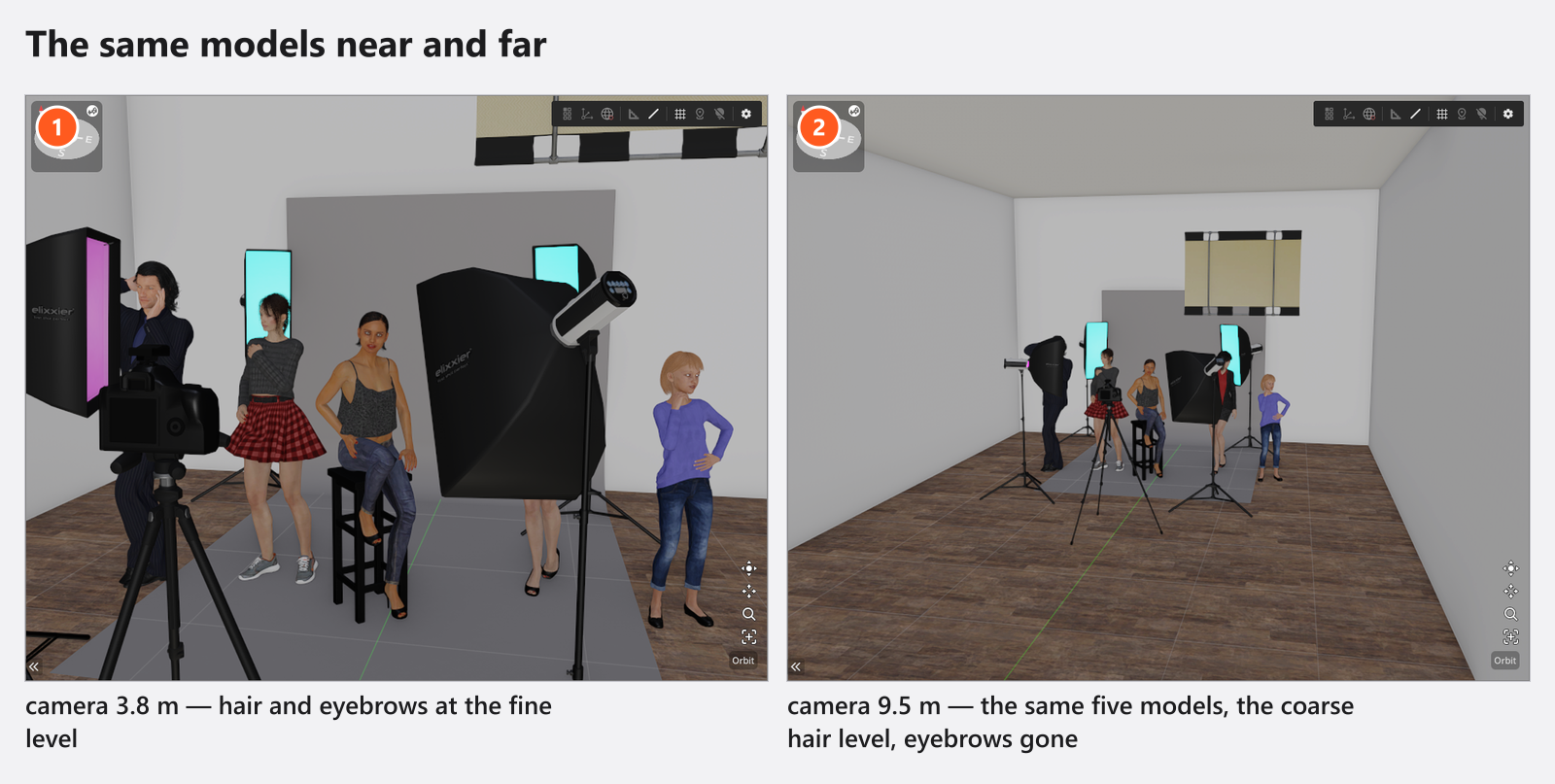
What to do. Nothing, as long as the model is a background figure. If it has to carry detail, bring it closer or frame it larger; if you are comparing two renders, render them at the same size. What the mechanism costs and saves is in Make it faster.
Not a bug
- Some labels in the model inspector are English in every interface language — the clothing picker and the finger and arm buttons among them.
- A model dropped into the set arrives in a standing pose. Animals ship with a single standing pose.
- Some volume and education licences keep every model dressed. That is a licence setting, not a fault — see License and activation problems.