
 English
 Deutsch
 日本語
日本語 简体中文
简体中文 Français
You look at the same shot in three places — the studio view you build in, the camera preview next to it, and the finished image in the RENDER tab — and the three never match exactly. That is by design, not a fault. This page explains what each picture is calculated for, so you know which one to trust and why noise disappears the way it does.
One way of calculating light
set.a.light 3D calculates light by tracing rays through the set: from the camera into the scene, off walls, reflectors and skin, back to your lights. No quality level turns ray tracing off — every level of the camera preview and of the finished render is ray-traced. All three pictures start from the same physical description of your lights, light shapers and materials; the working view then draws that description with its own, cheaper renderer.
What differs between the three pictures is how much work each one is allowed to spend.
Three pictures, three jobs
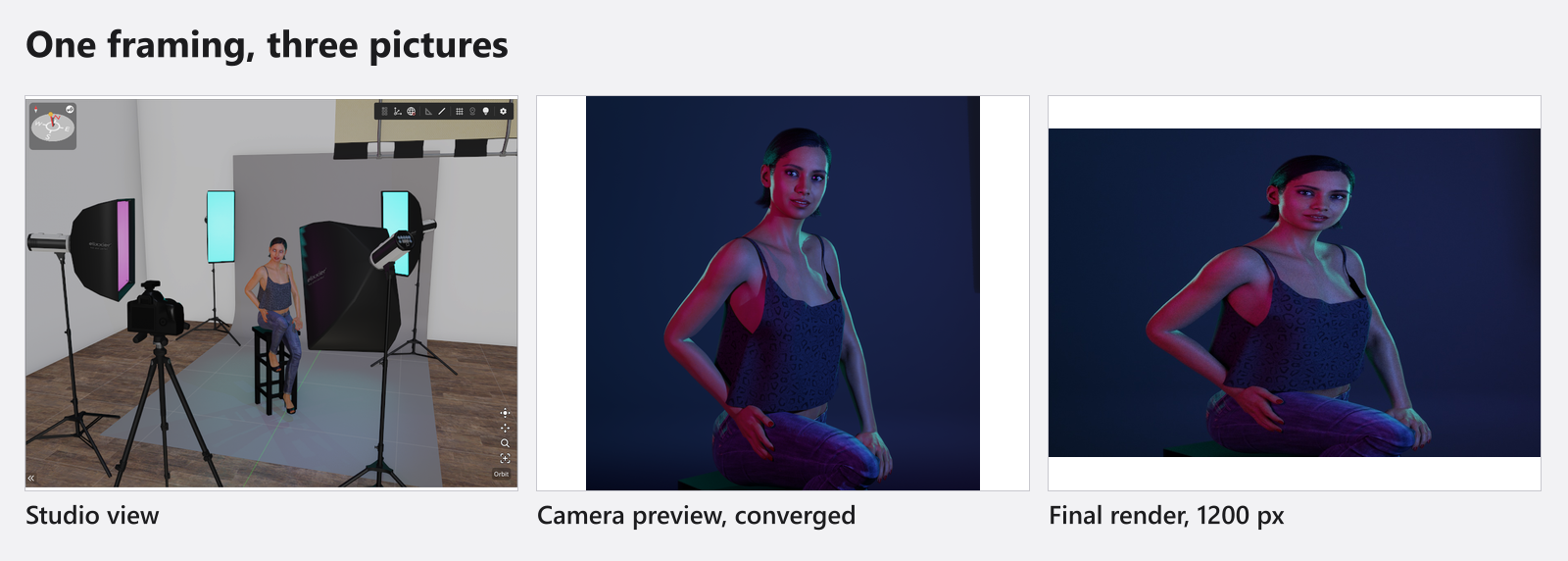
1200 pxThe studio view is a working view. It has to stay fluid while you drag a light across the room, so it draws a fresh picture every frame with a cheaper lighting pass, and below studio quality High at a reduced internal resolution as well. It is the right place to position gear and the wrong place to judge light.
The camera preview shows what the photo camera sees, at the size of its own viewport. While you are moving something it keeps drawing cheap frames; the moment you let go, the ray tracer takes over and refines the same image, sample by sample, until it reaches the target of the selected quality. Left alone for a few seconds, this is the picture that tells you what your lighting really does.
The final render is the same ray tracer again, at the output size you chose, with a larger sample budget, written to disk as a JPG. Nothing in the picture changes because it is a render — it is the same calculation with more pixels and more samples.
What a sample is, and why noise is the renderer working
For every pixel, the renderer sends out rays and gets one estimate of how much light arrives there. That is one sample. A single estimate is noisy, because each ray finds a different path through the set; many estimates averaged together converge on the true value.
So noise is not a defect and not a material problem: it is an unfinished average. It goes away by itself as the count rises, and it goes away more slowly the further the light has travelled — deep shadows, bounce light in a dark corner, a beam in fog and reflections in polished surfaces are always the last regions to settle. The sample targets of the four quality levels are listed in Quality and denoiser settings.
What the denoiser does
Averaging alone is expensive, so a second stage does part of the work: the denoiser looks at the accumulated image together with its surface information and smooths what is left of the noise. In the camera preview it runs while you watch, which is why the picture cleans up long before the sample counter has finished. In a render it runs once more at the very end — the sample counter reaching its target is therefore not the end of a render; the final pass follows.
The denoiser is the reason a moderate sample count is usable at all. It is also the reason two quality levels can look almost identical in a small image while the difference shows in a large one.
Three quality settings, one per picture
Each of the three pictures has its own quality setting, and changing one never changes the others: the gear in the studio tool strip serves the studio view, the gear at the end of the camera bar serves the camera preview, the gear in the RENDER tab serves the finished image. Which of them to touch when is the subject of Quality and denoiser settings.
One thing is genuinely shared: the detail at which textures are loaded. While you work, the quality of the camera preview sets it for the whole application; a render applies its own level for as long as it runs and hands the preview’s level back afterwards. That is why fabric or skin can visibly change sharpness without anyone touching a slider.
Where the studio view deviates on purpose
Two deliberate differences in the working view produce most of the “why does it look wrong” questions:
- Fog is compressed. Dense haze would turn the studio view into a white wall you cannot build in, so the view shows less of it than the camera preview and the render do. Judge fog in the preview or in a render.
- Its lighting can be simplified. The light-bulb button in the studio tool strip (Show Lighting in Studio) switches the view to simplified shading — cheaper to draw, and not a preview of your lighting.
On top of that the studio view has its own per-level profile: the number of indirect bounces, the contact shadows in corners and folds and the internal resolution all follow the studio quality setting, not the one of your render.
Troubleshooting
- The three views show different brightness, shadows or fog. → Graphics problems
- A render looks noisy, or seems never to finish. → Render problems