
 English
 Deutsch
 日本語
日本語 简体中文
简体中文 Français
The plan is only useful if somebody can build it. That means every position is a distance from a point both of you agree on, every light carries its power and its angle, and the gear list names what is actually in the van. This page prepares that plan and then says what the metered numbers promise on the day — and what they do not.
Applies to BASIC, STUDIO, CINEMA · Metering needs the Light Meter (STUDIO or CINEMA) · You need: a finished, lit shot in a saved project.
What you will have at the end
A PDF with a top-down diagram, one list page per shot, an equipment list with your substitutions — and a set of metered numbers written down next to it.
The route
- Decide the corner you will measure from, and set it. Open the Zero point menu and pick the room corner your assistant will put the tape on; the entry with a tick is the one in force. → The two floor fields of every object are renamed after that corner. See Set the zero point for measured positions.
- Read every position as a distance. Select each light, the camera and the model and check Transform. The third field is height, and height is always measured from the floor whatever the zero point is — that is the one thing worth saying out loud before somebody reports it as a fault.
- Draw the distances that matter. Press
M(by default) and drag from a light to the model. → The dimension line stays with the project and prints on the plan. Three or four lines beat twenty. See Select, move and measure objects. - Make the plan name your gear. A catalogue head on the page sends the assistant to the wrong case. Build the heads, shapers and lamps you own once, and the list names them from then on. See Add your own lights and light shapers.
- Meter the key, then the fill (STUDIO+). Put the Light Meter where the face will be, aim it at the camera, switch Halfdome Incidence off for a directional reading, solo the key and note the Exposure Value, then solo the fill and note it again. The difference is your ratio: one stop is 2:1, two stops 4:1. See Measure light and lighting ratios.
- Write the aperture down too. The meter’s Aperture row is the stop that exposes for the reading, printed as the nearest stop plus tenths —
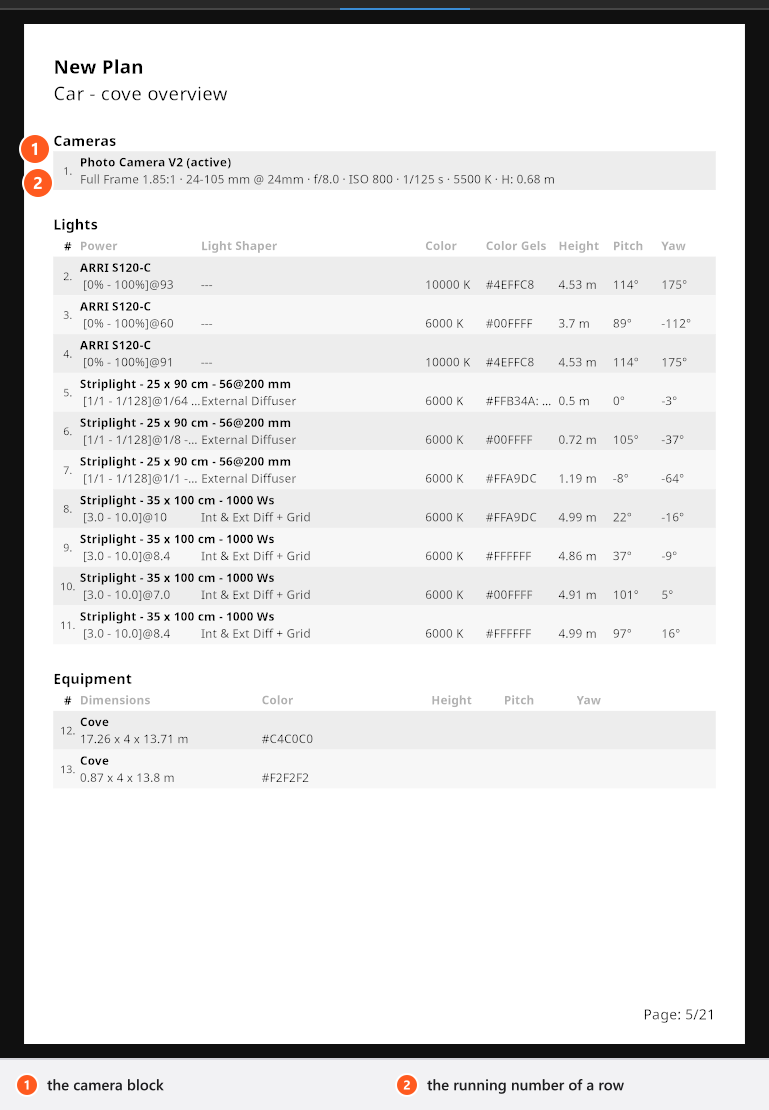
f/8.0 3means f/8 plus three tenths of a stop. - Check the per-shot list page. Select a page of the shot in the PDF plan and open the Set List group. Set List belongs to the whole shot and is on by default, so check it rather than switching it on; add Include Props when the props matter. → That page carries the camera line and one row per light with Power, Light Shaper, Color, Color Gels, Height, Pitch and Yaw. See Build the pages of a set plan.
- Make the diagram readable on paper. In the Studio View popup switch the walls that hide the lights off, lift Brightness, and pull Field of View down towards
20°for the near-isometric look. Then arrange the info fields, or press the layout button. - Build the equipment list and note the substitutions. Tick every shot that belongs to the job, then type into the Note cell of each row what you are really bringing, and put the timings in the general note. See Add the equipment list.
- Export, and take it with you. One PDF: cover, storyboard, a page per shot, the list pages, the equipment list. See Create a set plan.
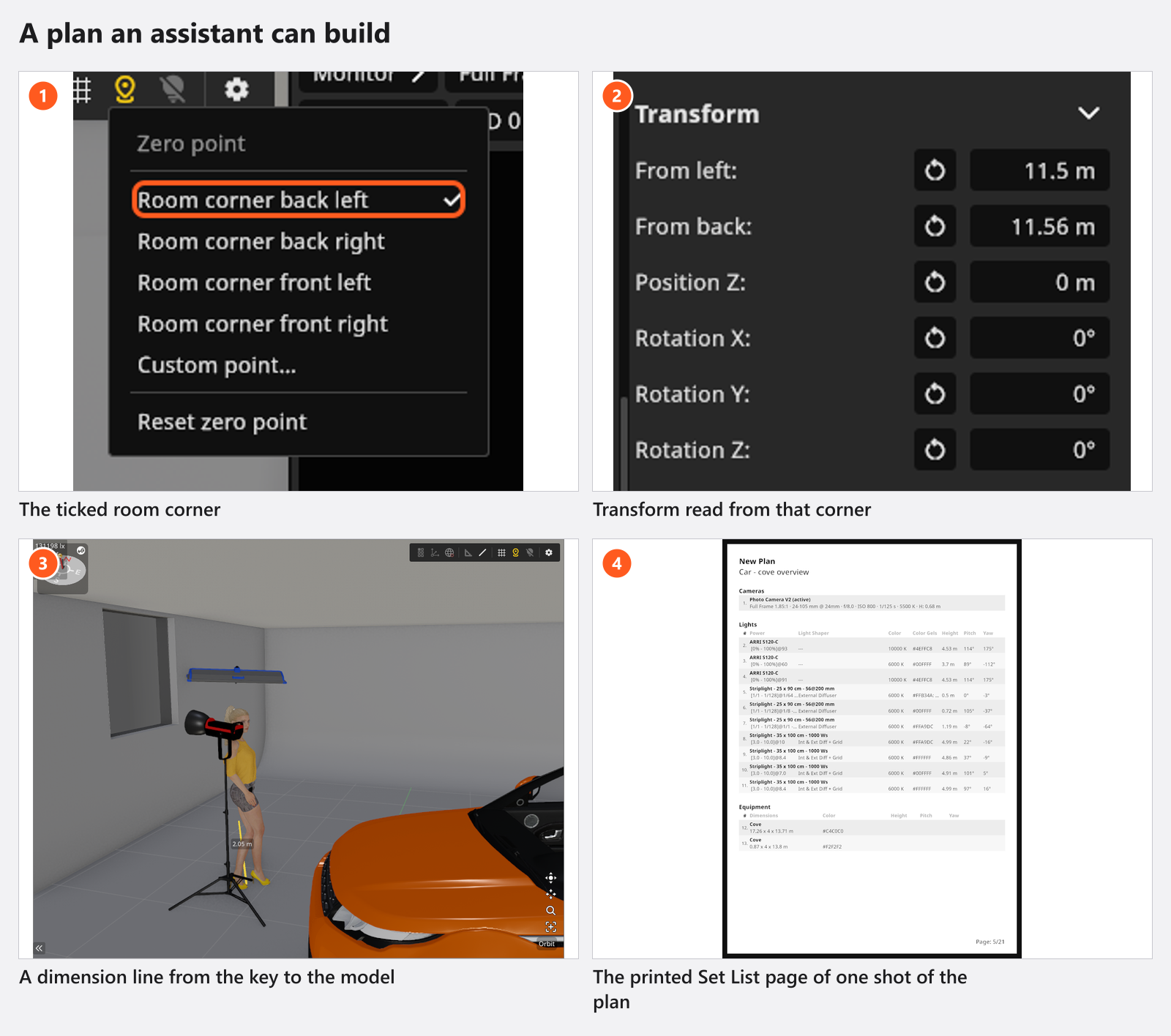
The clip shows that per-shot page, with the height and angle of every light. One correction: the narrator calls it the equipment list — the page is the Set List page, and the Equipment List is the single list for the whole plan.
What the numbers promise, and what they do not
- The meter is an incident meter: it measures the light arriving at its sensor, not the light reflected off the model — the same thing a hand-held meter does at the face.
- It always calibrates at
320. With the dome switched off, expect a small offset against your own meter. - A reading includes the light bounced off walls, reflectors and the floor, and any atmospheric fog, exactly as the render does. There is no way to meter one head’s direct light on its own; that is what soloing is for.
- Flash is metered independently of the exposure time and continuous light is not, so a mixed set transfers as two separate decisions — aperture for the flash, shutter for the ambient.
- The ratio travels better than the absolute level. Your real heads have their own output and their own falloff; the difference between key and fill is the number to reproduce first.
- Sun and sky are left out of a reading whenever the active camera is sealed inside a room without a visible opening — in the plan and in the render alike.
Pitfalls
- Switch solo off before you export. It is stored with the set, so a soloed shot exports a diagram with one light.
- Amount on the equipment list is the largest number one single shot needs, not the total across shots. That is what you pack.
- Props, models, rooms and backgrounds are not on the equipment list. They are on the per-shot list page, with Include Props on.
- The Internal Note of a shot is never printed. Anything the crew has to read belongs in a note region, a sticky note or the general note.
- Render the shots before you export, or the pages print their low-resolution previews.
- Say on the plan which corner the coordinates start from. The file carries it; a printed page does not.
What you have now
- A plan whose positions are distances from one agreed corner, with heights and angles per light.
- Metered ratios and a starting aperture, written down beside it.
- An equipment list that names your own gear and your substitutions.
- A document to hand over as it is: Hand over a shoot.
Troubleshooting
- A reading that says
Invalid, numbers that never settle, a meter that ignores the sun: Lighting problems. - Coordinates that do not match the floor: Objects, rooms and measurement problems.